

















Churches across the country are preparing to welcome thousands of families, longtime members, and first-time guests this Christmas season. And while ministry teams are working hard to create meaningful on-campus experiences, a clear and welcoming Christmas landing page remains one of the strongest tools to invite guests to participate in seasonal events and services.
A landing page often serves as a quick resource guide for first-time guests to your church during one of the busiest seasons of the year. It guides new guests and families, answers questions, and builds confidence long before they arrive on your campus. The churches highlighted below demonstrate how thoughtful digital communication creates a warm and simple experience for guests exploring Christmas services and events.
Make Christmas Service Times Easy To See & Understand
When people land on a Christmas page, the very first detail they look for is service times. If guests can see these quickly (without scrolling, digging, or clicking), they’re far more likely to plan their visit with confidence.
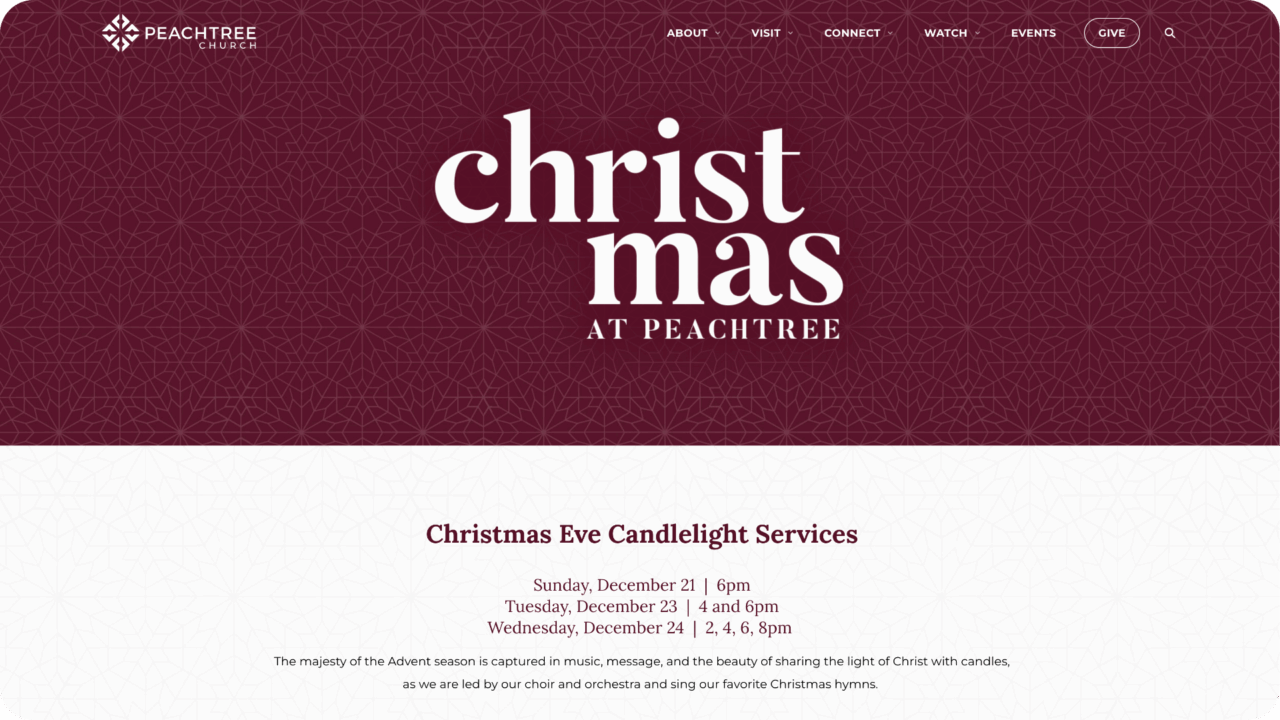
Peachtree Church (Atlanta, GA) excels in this area. Their Christmas landing page places service times front and center in a clean, easy-to-read way. This immediate clarity builds trust and helps guests make quick decisions.
Include Helpful “What To Expect” Details For Christmas Guests
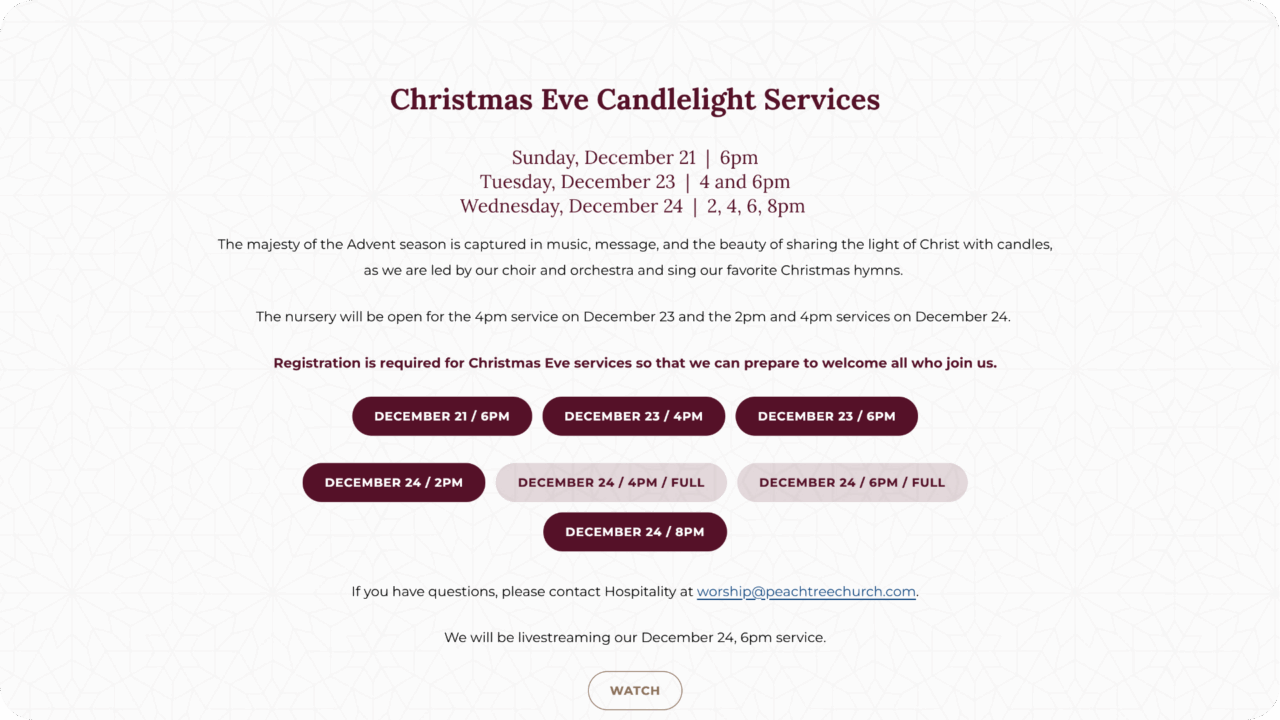
This section is also a natural place to offer simple expectations about family services, kids’ ministry, parking, or arrival times. Peachtree models this through clear labels and brief descriptions of their family-friendly services, ensuring visitors know precisely what the environment will be like when they arrive.
Present Events & Seasonal Schedules In A Simple, Scannable Format
December is full of concerts, gatherings, holiday events, and Christmas Eve services. A well-structured events section allows guests to scan quickly and choose what fits their schedule.
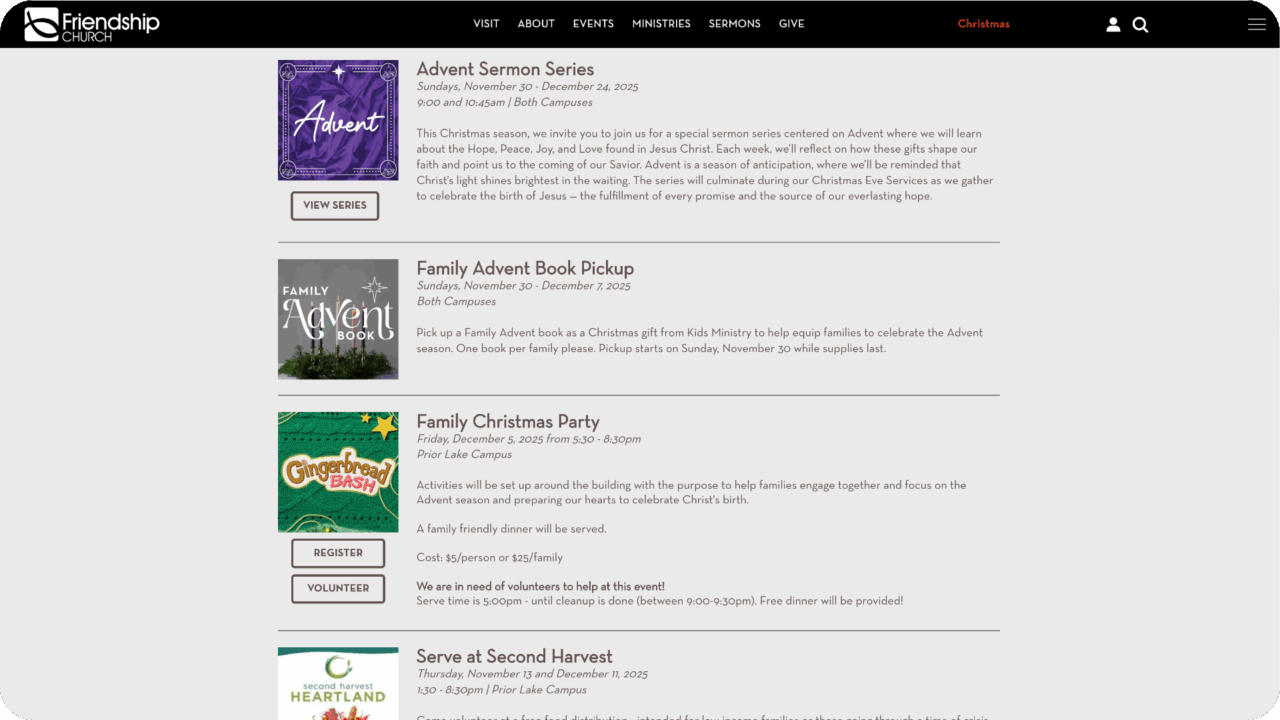
Friendship Church (Prior Lake & Shakopee, MN) demonstrates this beautifully. Their Christmas page organizes events with simple titles, approachable descriptions, and clear pathways to learn more. Guests can quickly grasp what the church is offering without being overwhelmed by information.
Use Imagery That Reflects Real People & Real Community
Photos communicate warmth, belonging, and expectation long before guests read a single sentence. The strongest Christmas landing pages use imagery that captures authentic moments and real community life.
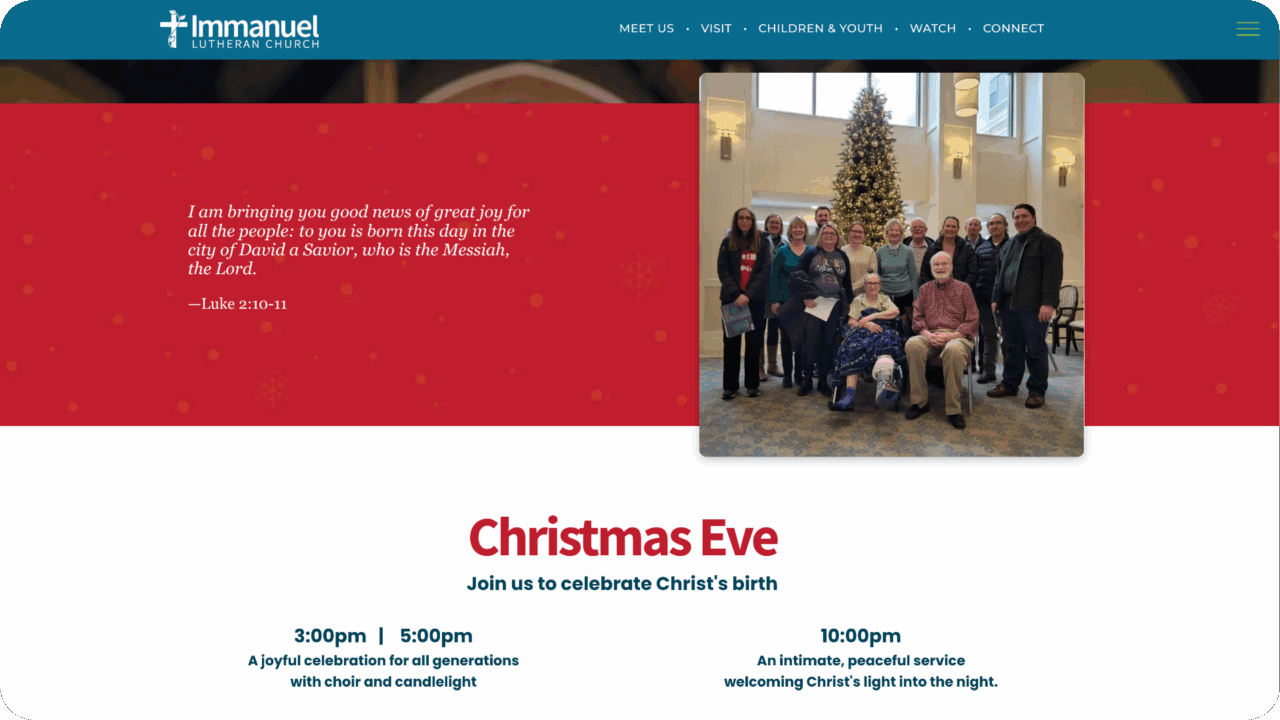
Immanuel Lutheran Church (Saint Paul, MN) excels in people-forward photography. Their Christmas visuals feature smiling faces and genuine moments of connection. These images help guests imagine themselves participating and reduce the distance between digital exploration and on-campus experience.
Support Multi-Campus Ministry With Organized, Location-Specific Details
For multi-campus churches, clarity becomes even more important during the Christmas season. Guests need simple pathways to find the campus closest to them and understand what each location offers.
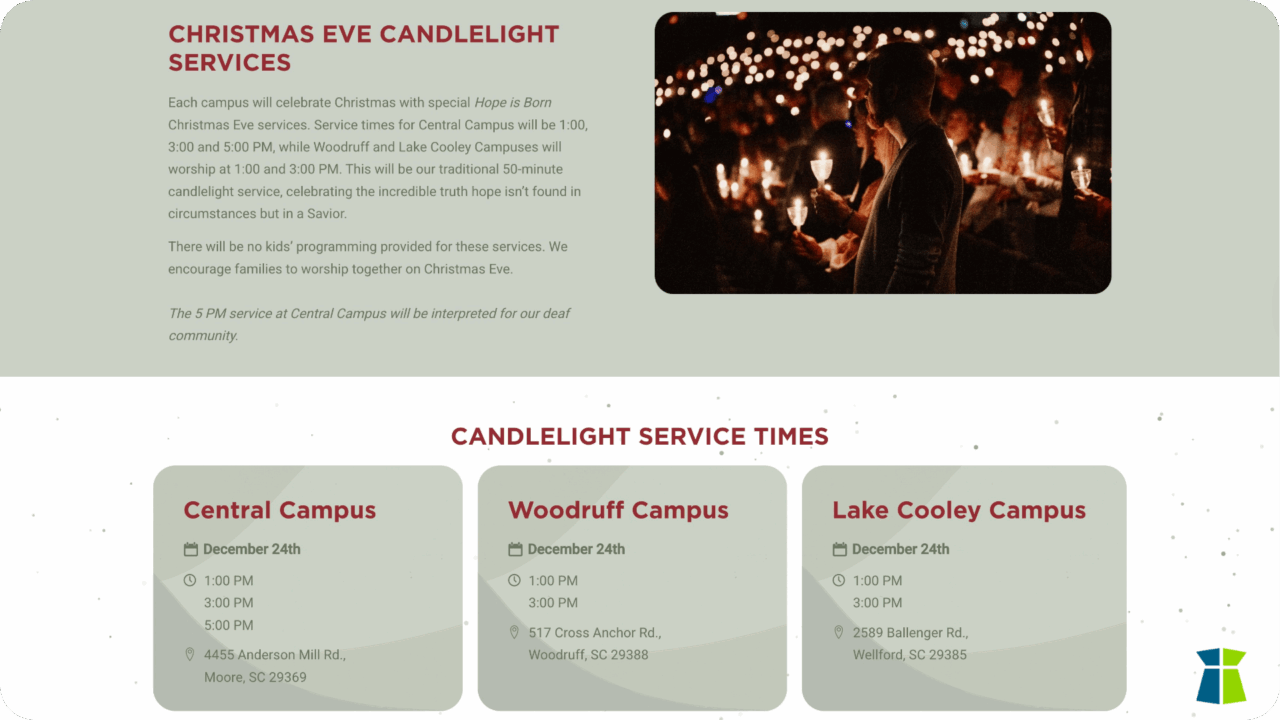
Church at the Mill (South Carolina) provides one of the clearest examples of multi-campus communication. Their Christmas landing page features dedicated sections for each campus with service times, event details, and clear Call to Actions (CTAs). Their design minimizes confusion and supports both first-time guests and committed members navigating a full holiday schedule.
Keep Your Christmas Landing Page Focused & Easy To Navigate
A focused Christmas landing page highlights what guests need most: services, events, and essential details. Clean navigation ensures that people don’t feel overwhelmed or lost while exploring the page.
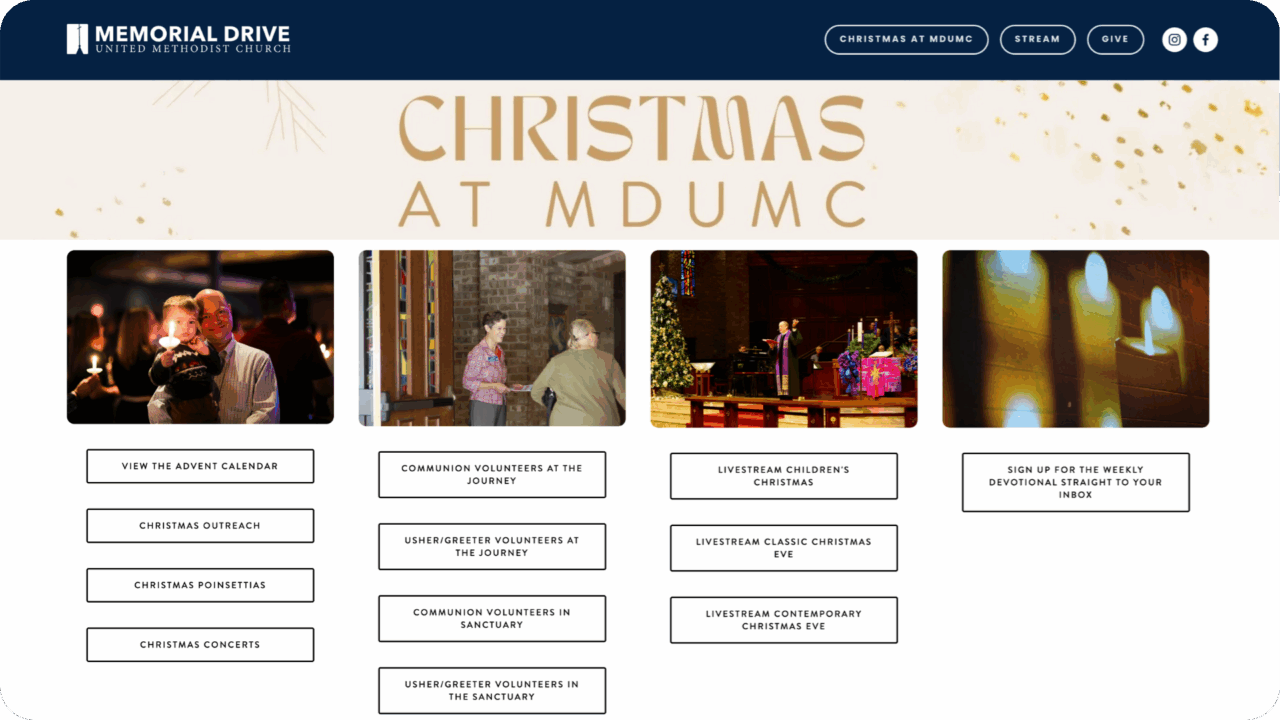
Memorial Drive UMC (Houston, TX) sets a strong example with easy navigation that allows visitors to jump directly to the section they need. Their page uses intuitive anchor links and clean section headers to guide guests smoothly through the content. Whether someone is looking for Christmas Eve services, family events, or holiday outreaches, they can find the right place with ease.
Clear Pathways Create Warm In-Person Experiences
A thoughtful Christmas landing page is both a communication tool and a ministry tool. When service times, event schedules, expectations, and campus details are presented clearly, families feel welcomed, prepared, and excited to participate.
These 5 churches show how intentional digital design and relational hospitality can work hand in hand to support meaningful engagement. Whether planning for Christmas, Easter, or any major ministry season, these best practices help churches create a welcoming invitation that reflects the warmth of their in-person ministry.
Empowering Churches With Integrated, Time-Saving Tools
Churches work hard during the Christmas season. They’re preparing services, coordinating volunteers, managing events, and caring for guests who may be walking through their doors for the first time. The weight of these responsibilities can make it difficult for staff to find moments to celebrate the season themselves.
That’s why several of the churches featured in this guide use TouchPoint Sites, a fully integrated website solution connected to TouchPoint Church Management Software.
When a church’s website, registration, communication, and data work together in one place, it removes countless administrative steps that normally slow teams down.
TouchPoint Sites helps churches:
- Keep all event details clear and consistent across platforms
- Simplify event updates, schedules, and registration in one place
- Make navigation easy for new and returning guests
- Support one unified digital pathway from website to database
When the digital side of ministry runs smoothly, church staff gain something invaluable: the time and emotional space to celebrate Christmas with their own families, volunteers, and communities.
Intentionally Built With Discipleship In Mind
Keeping everyone connected on their personal journey.

When a church adopts a new church management software (ChMS), the transition affects more than technology. It touches families as they learn a new way to check in their children, members as they adjust to different giving tools, and regular attenders figure out how to register for events. The true measure of this transition is how well it helps people stay connected to their faith journey—feeling supported, cared for, and able to engage without difficulty.
At TouchPoint Software, we’ve seen that when churches prepare their people with clarity and care, the process becomes smoother and members remain engaged. This guide outlines best practices for church staff who want to help their members embrace your new church software with confidence.
Cast A Clear Vision First
The goal is to make the transition feel as seamless as possible. Leaders can focus on how the new system will enhance connection, simplify participation, and support ministry in meaningful ways.
Your role as staff is to explain not only what’s changing but why it matters. A short, consistent vision statement repeated across communication channels will help everyone understand the purpose behind the transition.

Communicate With Clarity And Consistency
Clarity builds trust, and consistent messaging prevents confusion. Rolling out a new system is an opportunity to put those strategies into action.
Some best practices include using Sunday announcements to set expectations weeks before launch. Send emails and texts with specific examples: “Here’s how you’ll register for Fall Festival this year.” Record short video walkthroughs for new giving or event sign-ups. Add an FAQ page to your website to answer the most common questions. In most cases, churchgoers will only need to set up a new giving account using their preferred online payment option.
Cross Church in Northwest Arkansas, which averages over 9,000 churchgoers on a weekend, provides a strong example by maintaining a public FAQ page for new and visiting guests. Churches can model this by building their own FAQ hub to serve as a central, ongoing resource.
Roll Out In Manageable Steps
Significant changes are easier when introduced gradually. A phased rollout reduces overwhelm for both staff and congregants.
A simple three-phase rollout could look like this:
Start With Giving
Launch online and recurring giving first. According to ECFA’s State of Giving, church giving has not kept pace with inflation over the past few years. Encouraging recurring digital giving early provides stability and helps churchgoers feel confident in the process.
Add Event Registration
Once giving adoption has begun, move event sign-ups into the new system. Be sure the process is faster and more intuitive than before.
Introduce Check-In
Wrap up the rollout with children’s and volunteer check-in. Parents will appreciate the added security, and staff will benefit from better attendance records.

Provide Support Where People Need It
Friendly, visible support helps ensure every guest feels confident using the new system. Having welcoming team members available to offer guidance creates a smooth, reassuring experience from the start.
Place volunteers in the lobby with tablets on launch Sundays. Use stage time to show how quick it is to register or give. Equip small group leaders to be the first point of contact for questions.
With attendance patterns shifting (about one-third of U.S. adults now attend monthly in person, while 23% watch services online) it’s essential to provide support both in person and online.
Keep the Website Simple and Useful
During a transition, your website becomes the central hub for communication. If it’s cluttered, people will feel lost.
Focus on these key pathways: Plan a Visit, Give, Register, and Watch Online. Link directly to forms that flow into your database so staff don’t need to duplicate effort. Add a homepage banner that points churchgoers to the new system, with a clear message like: “Set Up Your New Giving Account Here.”
Barna’s 2025 research highlights that 75% of Christians value online giving options and 74% want digital resource hubs. Keeping your site simple and actionable helps meet those expectations.

Position The Mobile App For Committed Members
A church mobile app can serve various purposes, depending on the features it offers. For some, it may offer a welcoming entry into church life; for others, it becomes a valuable tool for deepening discipleship and engagement. The key is to introduce the app in a way that aligns with how your church uses it and the next steps you want people to take.
Introduce the app as the place where churchgoers can give, join groups, register for events, and receive ministry updates. Encourage downloads after someone takes a first step, such as registering for a class or setting up giving. Ask staff and group leaders to model app use so others see its value in practice.
This keeps the website as the public front door and the app as a resource for those taking their next steps.
Celebrate Milestones Along the Way
Change feels easier when people see that it’s helping them. Decide on meaningful goals ahead of time, then thank your congregation as you reach them. Examples include:
- Number of app downloads in the first month
- Percentage of recurring givers who moved to the new system
- Reduction in event registration times compared to the old process
- Small groups adopting digital communication tools
- Families successfully checked in using the new system
These milestones highlight how the system supports people in their discipleship journey and creates momentum for continued engagement.
Leading Well Through Change
Technology is only as effective as the people who use it. A successful transition is about more than a smooth migration—it’s about removing barriers, making next steps easier, and giving churchgoers confidence to stay engaged in their faith journey.
By casting vision, communicating often, introducing change in phases, and celebrating milestones, your church can help people stay connected to what matters most: discipleship and community.
Intentionally Built With Your Ministry In Mind
Keeping everyone connected on their personal journey.

“To the people we’re saying, you know, it’s a family, but as a large church, we need to make that real and make that true. And the way you make a large church small is to connect people together.” — Matt Keathley, Director of IT, Highland Park United Methodist Church
You know people are attending your church. The parking lot fills up, the children’s check-in area is hopping, and the worship center feels alive on Sundays. But here’s the lingering question: are they really connecting?
In larger churches, it can become more difficult to tell how connected people really are. Some attenders stay on the fringes, never moving beyond Sunday mornings. Others disappear without anyone realizing it until months later. As church leaders, we carry the responsibility of making sure our people aren’t just showing up but are truly growing as disciples. The challenge? The path from first-time guest to fully engaged disciple often feels fuzzy and difficult to measure.
The good news: with the right data, even large churches can see where people are on their discipleship journey — and guide them to take their next faith step with confidence.

Why Measuring Church Engagement Matters
At the heart of every church is the Great Commission: “Go and make disciples.” (Matthew 28:19) But somewhere between Sunday attendance and maturing as a fully devoted follower of Jesus Christ, people slip away.
Research shows that 82% of people who drop out of church do so within their first year. The most critical moments come at the six-month and twelve-month marks, when newcomers are still deciding if they belong. Without visibility, leaders often don’t realize a family has fallen away until it’s too late (ChurchAnswers.com).
Attendance alone doesn’t tell the story. Healthy churches are built on connected disciples — people who are involved in community, serving in ministry, and investing in the mission. Leaders need a way to track that journey, so that nothing gets lost in the busyness of ministry. Not having actionable data is like leading a fleet of ships in the fog — you’re moving forward, but you don’t know who’s drifting off course.
A Flexible Church Discipleship Pathway
Every church tradition has its own language for the discipleship journey. Baptists and nondenominational churches often use Next Steps or Growth Track classes before membership. Methodists emphasize membership vows (prayers, presence, gifts, service, witness). Catholic parishes typically focus on parish registration and sacramental milestones as the on-ramp to deeper involvement.
The specifics vary, but the journey tends to follow the same broad movements of engagement. Here’s a flexible pathway that can be adapted to your context:
- Curious – Spiritually curious but unconnected. May visit a church website, watch a livestream, or be invited to an event.
- Guest – First-time or infrequent visitor. They’re testing the waters and observing the culture.
- Attender – They come regularly for church services but aren’t yet plugged in. They’re spiritually open, but not yet relationally invested.
- Membership / Next Steps / Parish Registration – Depending on tradition, this could be a Next Steps class, a membership covenant, parish registration, or participation in sacramental preparation.
- Engaged – They’ve joined a small group, started attending classes or volunteering, and are starting to identify with the mission of your church.
- Committed – Giving financially and leading (a group or serve team), these are your core people. They’re invested in the health of the church.
- Kingdom-Minded – Living out their faith beyond the church walls—multipliers, mentors, missionaries, legacy givers.
The order may shift slightly depending on your church’s structure, but the principle is the same: people move from initial attendance to commitment to ownership.
The key for leaders is recognizing these milestones in your context and ensuring you have visibility into who is taking those steps (and who isn’t).
How Data Supports Church Discipleship
Without data, leaders are left with guesswork and anecdotal stories. With data, you can track movement clearly. Here’s how it breaks down:
- Attendance Data – Who is showing up, how often, and who has stopped
- Group Involvement Data – Which individuals are connected beyond Sunday worship
- Volunteer Data – Where people serve, how consistently, and for how long
- Giving Data – Whether someone has begun to invest financially in your mission
This isn’t about reducing people to numbers. It’s about using visibility to shepherd more effectively. Data gives pastors and leaders the early warning signs — when a family misses three Sundays in a row, when a consistent giver stops tithing, when a faithful volunteer suddenly steps back. With that clarity, churches can step in relationally before someone drifts away entirely.

Building A Discipleship Dashboard For Your Church
Imagine you’re looking at your church’s year in review. You start with 1,500 visitors:
1,000 of them return within a few weeks.
600 eventually take a membership or Next Steps class.
400 join a small group or ministry circle.
300 begin serving regularly.
200 begin giving consistently.
That’s a funnel. And with that funnel, you can see your strengths and opportunities. Maybe your church is great at welcoming guests but struggles to transition them into community. Or maybe groups are thriving, but fewer people are moving into volunteering.
A simple dashboard can make these ministry gaps clearer. The point isn’t to obsess over percentages. It’s to identify barriers in your church discipleship process and empower ministry teams to address them.
A Scenario: How To Turn Data Into Decisions
Imagine a large church evaluating its discipleship funnel and noticing a major drop-off between group involvement and volunteering. Thousands are connected socially through classes and small groups, but far fewer are serving.
With that clarity, the leadership team could create a “Next Step Sunday,” where group leaders introduce serving opportunities that fit naturally with group rhythms. Over the next six months, it’s realistic to expect that hundreds of people from existing groups might step into a volunteer role.
Without data, that barrier would remain invisible. With data, leaders can respond strategically — and the church becomes healthier as a result.

The Role of Leadership in Building Healthy Church Discipleship Systems
No pastor or staff member can disciple every person personally. But leaders can help build healthy systems that make sure that no one goes unnoticed.
The unique role of leadership is to connect strategy to ministry and data to discipleship. When those pieces come together, staff and volunteers can engage relationally with clarity and confidence.
When you have visibility, you can lead with peace of mind — knowing your church isn’t just attracting attenders but truly making disciples.
Clarity Creates Confidence
Guests don’t become disciples by accident. They become disciples when churches intentionally guide them through the journey — from first-time guest to fully-engaged servant and giver.
But here’s the truth: you can’t guide what you can’t see.
By mapping the church discipleship path and measuring engagement data, churches can ensure fewer people slip through the cracks and more people find their place in God’s mission.
Don’t let the pathway stay fuzzy. Map it. Measure it. Use it to shepherd your people more intentionally.

In 2025, phones are everywhere in church—during conversations in the lobby, small groups, and even in worship. And behind every tap and swipe is the same desire: connection, comfort, and community.
As a leader, you want to meet people where they already are—but without feeling like you’re sacrificing depth for digital. The good news? You don’t have to.
According to Barna’s research on digital tools, 75% of churchgoers support online giving, 74% want a digital resource hub, and 70% value social media outreach. Your people are already there. The question is: Is your church showing up in those spaces in a way that feels authentic and useful?
We’ve worked with many large churches across the country that are moving beyond “having an app.” They want mobile tools for churches that genuinely support ministry—not digitize it for the sake of convenience. Below are five digital discipleship tools helping churches do exactly that.

1. Real-Time Spiritual Support Tools
People are carrying burdens throughout the week, not only on Sundays. Offering prayer tools or pastoral support through your church mobile app allows them to feel known and cared for right when they need it.
A recent study in the Journal of Religion and Health found users of Christian prayer apps experienced 74% less stress, 69% less anxiety, and 60% less depression. Apps like these aren’t merely convenient—they offer real spiritual and emotional relief.
The best church apps go beyond simple contact forms. They include features like:
- Integrated prayer walls where people can post requests and see others praying for them in real time.
- Private or public prayer options, giving members control over how much they share.
- Notifications and updates, so someone knows when their church family has prayed for them.
- Pastoral visibility, allowing leaders to track needs and respond personally when care is needed.
These tools transform prayer from a Sunday ritual into a continuous community practice. When someone can share a request on Tuesday morning and have their church praying by Tuesday afternoon, the app becomes more than technology—it becomes a lifeline.
2. Empower Staff Care From Anywhere
Great ministry happens in moments—between services, during visits, or right after a meaningful conversation. Equipping your team with a mobile-first task and notes system can transform your care efforts.
Equipping your team with a mobile-first task and notes system can transform your care efforts:
- Staff capture insights immediately—no forgetting, no delays.
- Teams gain visibility into care needs and progress.
- Ministry responds faster and pushes past administrative overwhelm.
When these tools are accessible from anywhere—whether a hospital visit, coffee conversation, or midweek prayer walk—ministry becomes proactive and deeply personal.
3. Personalized App Experience
A strong church mobile app shouldn’t feel like a miniaturized website—it should feel like an intentional extension of your church community—personal, relevant, and timely for each person in your church.
As the Barna research states from above, congregants expect church engagement technology to feel integrated into their spiritual lives—not only added on.
What this means for your app:
- Design interfaces so content dynamically adjusts—surfacing relevant events, devotionals, and groups.
- Use push notifications that align with a person’s engagement—think reminders for upcoming small groups or encouragement tied to their recent activity.
- Compose dashboards that reflect each user’s spiritual journey and areas of involvement.
By building an experience based on visibility, relevance, and personal interaction, you transform your app from a functional portal into a relational touchpoint.
4. Midweek Spiritual Growth Content
Churchgoers want more than a Sunday message. They’re looking for ways to stay spiritually connected throughout the week.
A Baylor University study (conducted with Harvard) used smartphone surveys twice a day for two weeks to measure people’s daily spiritual experiences—like sensing God’s presence or finding inner peace. The results showed that these spiritual check-ins buffered stress and were directly tied to higher well-being and flourishing.
Other research points in the same direction: after 2020, many churches noticed midweek digital engagement rise through livestreams, podcasts, and small group tools. And digital discipleship continues to grow—YouVersion’s Bible App for Kids alone saw nearly 90 million Bible stories completed in 2024, showing that believers are eager for faith touchpoints outside Sunday services.
Whether it’s daily encouragement, a short devotional, or a podcast episode, your church app can be the tool that carries discipleship into Monday through Saturday.

5. Mobile Giving Tools
Generosity grows when giving is simple and accessible. According to Nonprofit Source, mobile giving donations have increased by 205% in recent years, and recurring donors give 42% more annually than one-time donors. Barna finds that 44% of U.S. adults are digital donors, illustrating how digital giving has become a normalized part of charitable behavior across generations.
One of the most powerful ways to encourage generosity is through an authenticated, logged-in church mobile app. Because members are already recognized when they sign in, giving becomes seamless—no repeated forms, no extra friction, and no lost records. In the same place where they’re watching sermons or submitting prayer requests, they can also set up recurring donations in seconds.
And this principle goes beyond giving. Authenticated apps make event registrations, group sign-ups, and volunteer scheduling equally simple, because the user’s information is already connected. That’s what makes mobile tools for churches a true extension of community life—not only a convenience, but an integrated way of participating in church.
Team Conversation Starters: What Does A Meaningful Mobile Experience Look Like?
Use these questions to guide your staff through valuable conversations:
- Are we replicating our website in an app? Or are we building a mobile-first experience with real value?
- Can our app reflect our church’s personality and voice? Does the branding feel like “us”—from color to tone?
- Is the experience personal to each user? Do churchgoers see updates relevant to their groups or ministries?
- Can our staff care for people in real time? Are they able to log prayer needs, assign follow-ups, and take notes on the go?
- How does our app support ministry between Sundays? What tools or content encourage spiritual connection throughout the week?
Mobile Ministry Is Ministry
Mobile tools for churches are not about being trendy—they’re about being present. When someone needs prayer, wants to serve, or feels inspired to give, they can act immediately, right from their phone.
You do not need more tools—you need the right tools—mobile tools for churches that help your team focus on people.
Let’s help your church engage better—not on Sunday alone, but every day.
Tailored for Every User
Mobile tools for churches are not about being trendy—they’re about being present. When someone needs prayer, wants to serve, or feels inspired to give, they can act immediately, right from their phone with Touchpoint’s dynamic church management software.
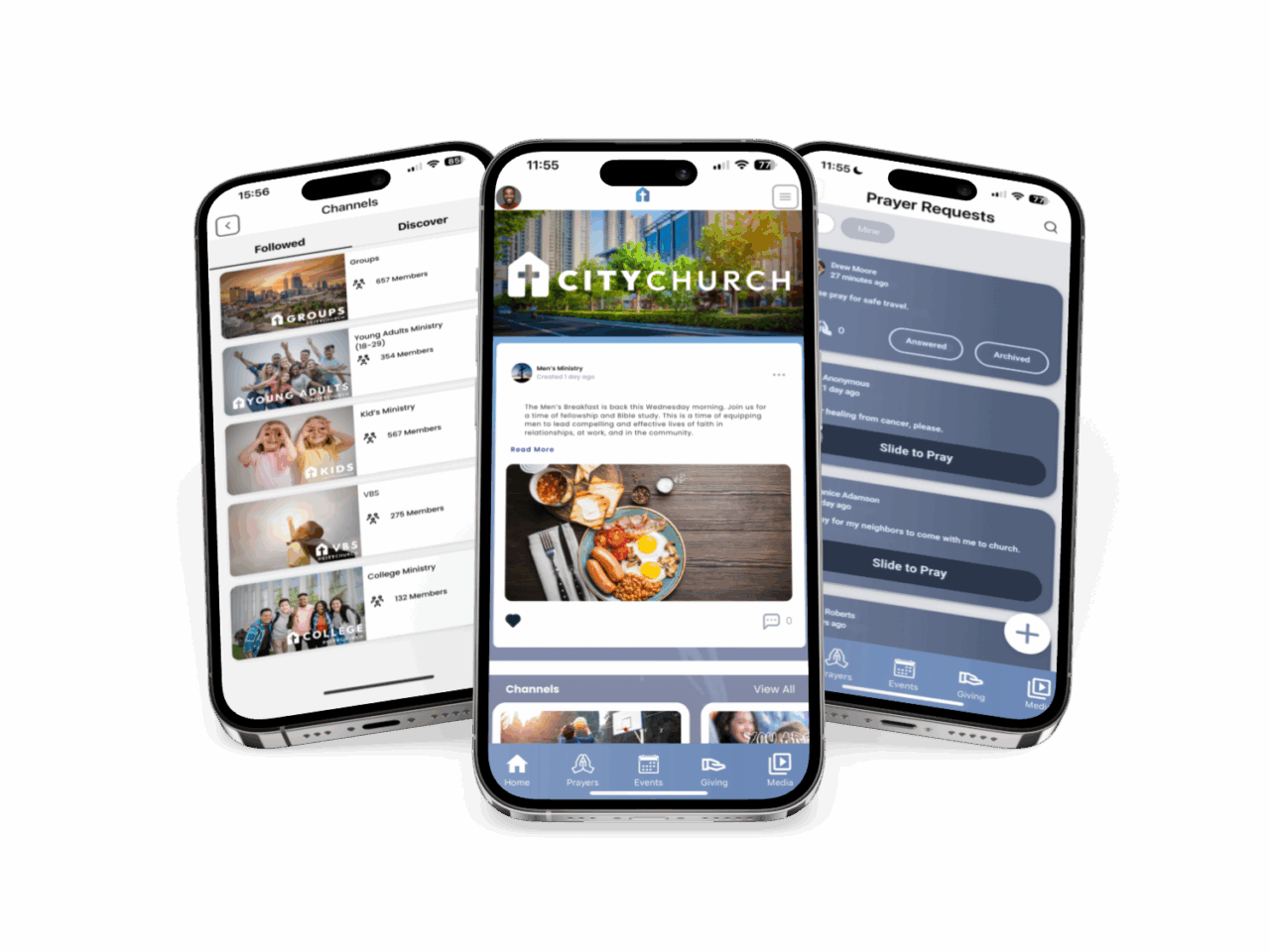
You’ve probably already used NFC technology today. Maybe you tapped your phone to pay for coffee. Or waved your watch over a terminal to board a flight. NFC (short for Near Field Communication) is everywhere now, making everyday interactions smoother and faster.
So what if your church could use that same simplicity to remove friction from giving, registrations, or communications?
NFC tags help reduce barriers for guests and create a smooth experience for your staff and volunteers—by using tools people are already familiar with in everyday life. They provide instant access to giving, registrations, and connection forms without extra steps or complicated instructions.
In this post, we’ll walk through:
- What Are NFC Tags & Why They Matter for Churches
- Can You Use NFC Tags With TouchPoint?
- Important Security Tips
- NFC Tags Can Increase Generosity
- Practical Ways Churches Are Using NFC Tags for Engagement
- A Unique Idea From Our Partner Church
- General Instructions To Set Up NFC Tags
- Can NFC Tags Be Reused?
- Questions to Help Your Team Decide if NFC Is the Right Fit
What Are NFC Tags & Why They Matter for Churches
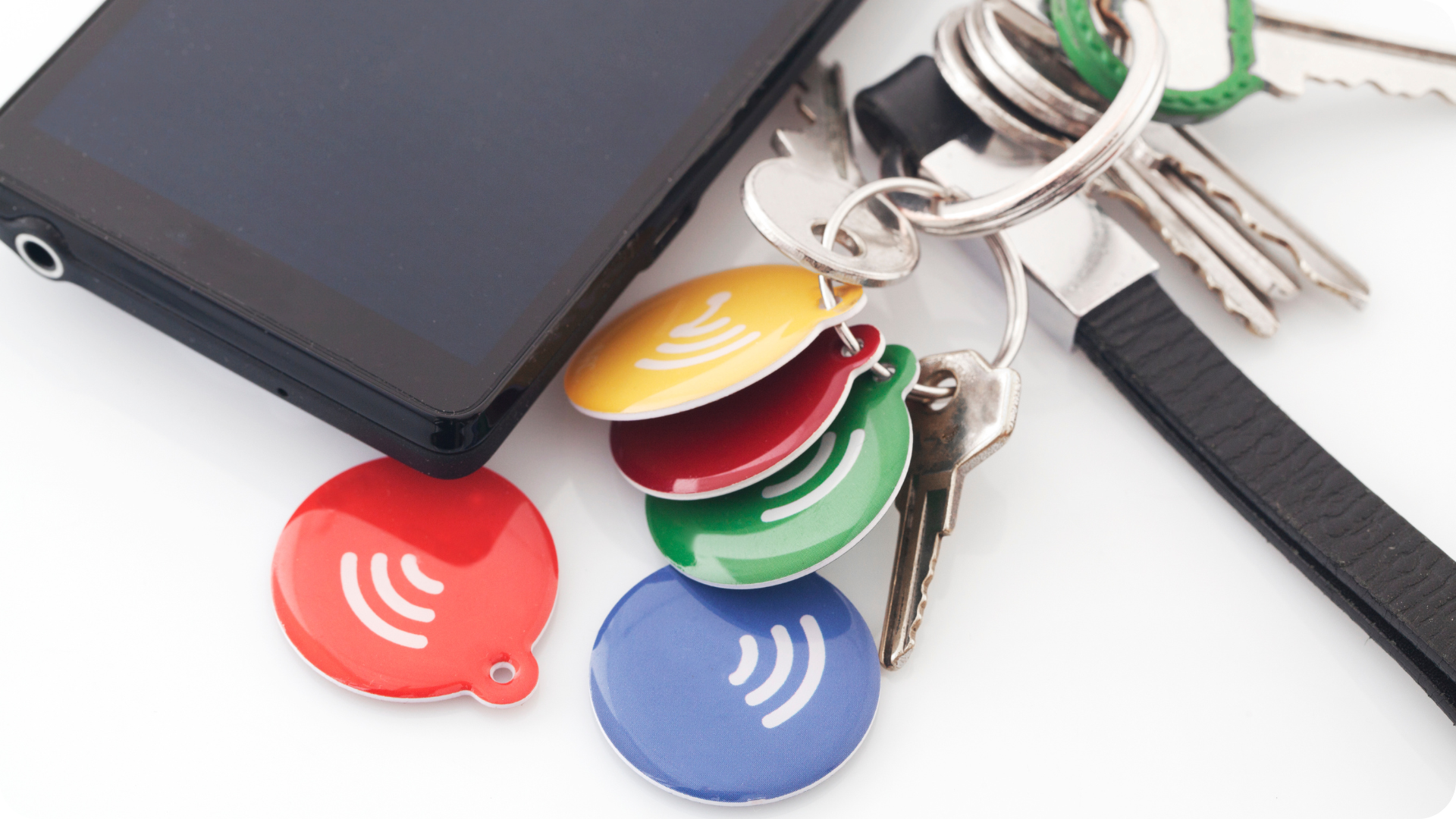
NFC tags use the same technology that you’re probably familiar with using in everyday life: tap-to-pay credit cards and Apple/Google Pay. With an NFC tag, you can store a link (like a giving page or registration URL) and let someone access it just by tapping their phone.
It’s simple. It’s fast. And it reduces friction for everyone—from guests to your most faithful members.
Can You Use NFC Tags with TouchPoint?
YES!
If your church uses TouchPoint or TouchPoint Giving, you’re already NFC-ready.
You can link a NFC tag directly to:
- Your main giving page
- A specific fund or campaign
- An event registration form
- A volunteer or baptism sign-up
- A digital connection card
Each of these pages can be linked to your church’s website. No third-party URLs. No extra friction. Only a clear next step—delivered with a tap.
Important Security Tips
While NFC tags are easy and convenient, they also need to be used with caution. James Kurtz, Director of Technology at Tenth Presbyterian Church, emphasizes that, as with any tech tool, there is always the possibility of misuse. Churches should take this seriously by planning ahead, testing regularly, and securing tags both physically and digitally to safeguard their ministry.
Here are a few simple steps to make sure your tags stay secure:
- Store securely when not in use. If your church only uses NFC tags during specific events or services, keep them out of sight and locked away when not needed. This reduces the risk of tampering or confusion.
- Use the “lock” feature after programming your tag. This prevents anyone from rewriting or replacing your link later on.
- Choose NFC tags from reputable suppliers with good reviews and clear specifications. Higher-quality tags tend to be more reliable and have better memory protection.
- Select NTAG213 or NTAG215 chips if possible, as these are widely supported and have dependable security features.
- Place tags in low-risk, monitored locations like lobbies, kiosks, or tables that staff can easily observe.
- Avoid placing NFC tags in unsupervised public areas (like parking lots or outdoor signage), where they’re more likely to be tampered with.
- Test periodically to make sure the tag is still pointing to the correct URL and hasn’t been replaced by a malicious look-alike.
Just like any tool in ministry, using it wisely ensures it continues to build trust and support the mission.

NFC Tags Can Increase Generosity
One of the biggest advantages of NFC tags is how they make giving simple and immediate. A quick scan can turn intention into action without extra steps or friction. And when giving is easy in the moment, people are more likely to respond.
While there isn’t yet large-scale, peer-reviewed research specific to NFC tags in churches, early reports and broader giving studies point to a compelling trend:
- A church using TAPiTAG reported a 300% increase in donations after placing NFC tags in high-traffic areas like the lobby and coffee bar.
Note: These statistics are vendor-reported and results may vary by church size, communication strategy, and placement.
Beyond NFC-specific insights, broader research supports the value of digital simplicity:
- 44% of U.S. adults prefer digital giving options, and 75% of Christians believe their church would benefit from them (Barna)
- Churches that accept online giving see, on average, 3–5% more donation growth than those that do not (Outreach Magazine)
But the technology is only half the story. The real impact comes when generosity is connected to a bigger picture. As Morgan Mudge, VP at TouchPoint, explains:
“When we don’t tell the story of what God is doing through our ministries, generosity feels transactional instead of transformational.”
That’s why pairing an NFC tag with a story of impact is so effective. Instead of linking only to a form, point people to a giving page with a video from a mission trip, photos from a local outreach, or even a simple note about how their gift is being used this week. A tap becomes more than a transaction—it becomes an invitation to join in God’s work.
Practical Ways Churches Are Using NFC Tags for Engagement
Churches across the country are finding creative ways to use NFC tags beyond giving. These are a few common applications you can try right away:
- Giving stations: Stick NFC tags on signs, tables, or mounted plaques. “Tap to give” becomes a natural part of your lobby or worship center.
- Connection cards: Use NFC tags to launch a digital connection form for guests. Place them on welcome center counters or in first-time visitor bags.
- Compose a text message: Make it easier to text a reply word to your church phone number by configuring your NFC tag to draft a text with a pre-typed message to your team.
- Volunteer or baptism sign-ups: Stick a tag near your serve wall, info center, or signage promoting next steps.
- Event registration: Place tags on printed materials, posters, or table tents to drive sign-ups for retreats, camps, or workshops.
- Logan George, Cyber Security Professional, suggested using NFC tags to support a tool check-in and check-out system for ministry inventory management—helping maintain accountability and streamline resource tracking.
The best part? You don’t have to choose just one. These tags are flexible and can support multiple ministries across your church.
A Unique Idea From Our Partner Churches
One of our partner churches has taken NFC implementation a step further with creative, ministry-specific applications:
- Matt Keathley, Technology Director at Highland Park United Methodist Church, shared his ideas for the possible implementation of custom NFC-enabled keychains for volunteers in the kids’ ministry. These not only served as a tool for quick access to Check-In stations and needed systems but also cultivated a sense of appreciation and teamwork among the volunteer team.
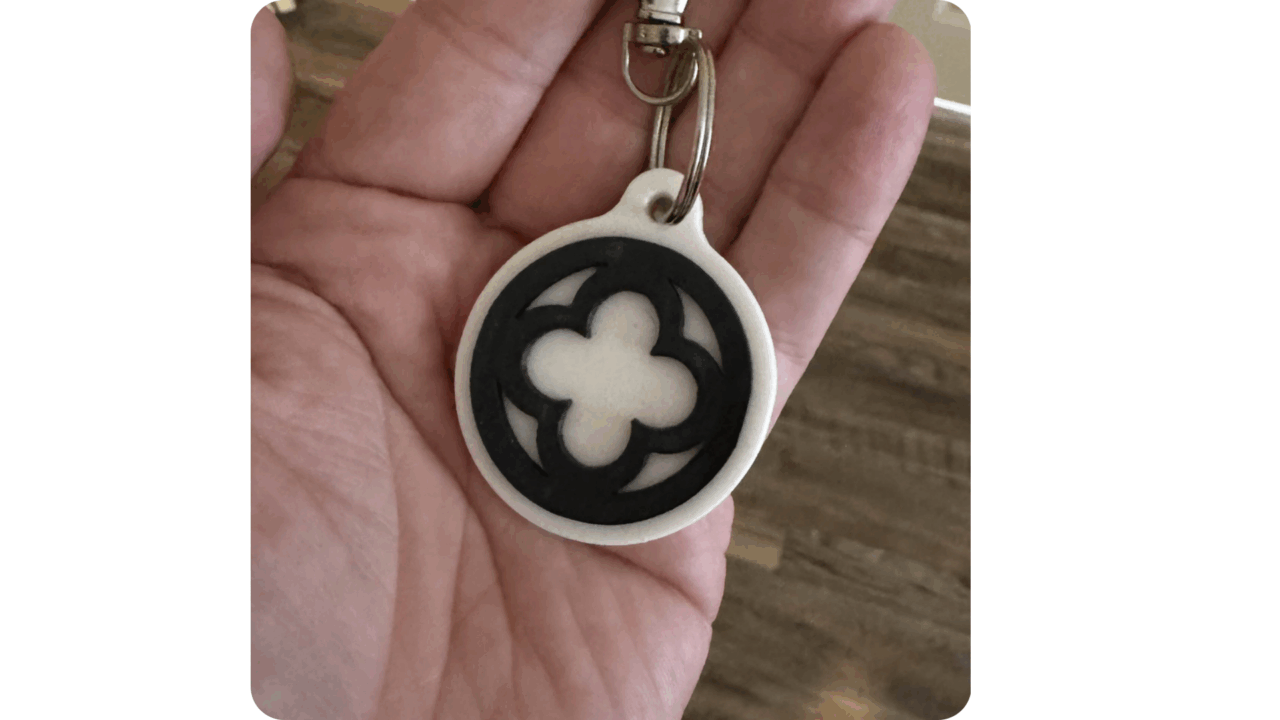
These examples highlight the flexibility of NFC tags to support a wide range of ministry goals—from operational efficiency to volunteer care and appreciation.
General Instructions to Set Up NFC Tags
You don’t need a developer or tech team to get started. Here’s the process:
- Buy NFC Tags
Purchase from a reputable source that clearly lists compatibility (NTAG213 or NTAG215 recommended). Avoid unbranded bulk tags with no specifications. - Use an App to Program Them
Download a free app like NFC Tools (available on iOS and Android). Use it to:- Write your custom TouchPoint URL
- Set a redirect to your giving or event page
- Lock the tag if you don’t want it edited
- Test It
Tap your tag with both iPhone and Android to make sure the page loads instantly. - Place It
Stick it on the back of a pew or seat, in the lobby, on a classroom door, or even on a printed card in a welcome bag.
Can NFC Tags Be Reused?
Yes—most NFC tags are completely rewritable, especially if you use NTAG215 or NTAG213 chips.
Using a free app like NFC Tools, you can:
- Erase the current data on a tag
- Reprogram it to point to a new URL or function
- Lock it (optional) to prevent further changes
This means you can reuse tags for seasonal events, rotate them between ministries, or repurpose them as your needs evolve.
Questions to Help Your Team Decide if NFC Is the Right Fit
Here are a few questions to help your team decide if this is a safe, manageable, and strategic next step:
- Do we want to make giving and sign-ups easier for guests and regulars alike?
- Would our congregation respond well to tap-based technology?
- Are our current next steps clearly visible and accessible on Sundays?
- Do we already use or plan to use branded giving pages through TouchPoint?
- Do we have team capacity to monitor, test, and maintain NFC tag locations?
- Are we confident in our ability to secure and manage technology in public spaces?
- Do we have someone on staff or in a volunteer role who’s comfortable handling the tech setup?
If most of these resonate with your team, NFC tags could be a practical and low-cost way to streamline next steps and make engagement more accessible for everyone.
Bringing It All Together
NFC Tags for churches are about removing barriers so people can step more fully into generosity, connection, and discipleship. By combining simple technology with meaningful stories, your church can make next steps clear and accessible—whether that’s giving, signing up, or getting involved. In the end, NFC tags are one more tool to help your ministry invite people into the bigger story of what God is doing through your church.
Are your Registration Forms helping or hurting your ministry?
In our latest TouchPoint webinar, we explored how Registration Forms can do more than collect names—they can fuel connection, ministry growth, and next steps in faith.
This insightful session featured Becky Gossard, one of our experienced Consultants, and Matt Brown from our Marketing Team, who both share the perspective of a former Church Database Administrators. Together, they discussed tools, strategies, and practical applications that churches of all sizes can begin using immediately.
If you missed it, here’s a recap of the key takeaways.
What Kinds of Events Need Registration Forms?
We began by covering the most common use cases: small groups, Bible studies, retreats, VBS, and celebrations, along with missions trips and camps.
We also highlighted how Registration Forms are useful far beyond events. Many churches use them for newsletters, volunteer onboarding, bookstore orders, policy acknowledgements, spiritual gift assessments, and reference submissions.
Registration Forms are not just about logistics—they are about engagement.
How Do We Make Our Forms Smarter and Easier?
To keep Registration Forms both inviting and useful, we discussed the importance of customization. Conditional logic allows forms to display only the questions that matter to each registrant. Dynamic pricing options, such as early bird rates or scholarships, simplify finances. Custom branding ensures that forms feel like your church—not a third-party platform.
We also encouraged teams to use confirmation pages and emails to invite people into next steps like event follow-ups, app downloads, or volunteer opportunities.
What Should Our Communication Look Like Before and After?
Your Registration Form isn’t the only touchpoint that matters. We walked through how churches can send branded confirmation emails, event reminders, and post-event follow-ups. All of this can be automated using TouchPoint’s workflow tools.
Every communication is a chance to minister. A follow-up email isn’t just about reminding people of logistics—it’s an opportunity to keep the connection going.
What Should We Do With the Data We Collect?
Collecting data is only helpful if you know how to use it. We talked about ways to run reports, spot registration trends, identify first-time guests, and trigger next steps with Process Builder. Many churches use this data to make better ministry decisions and to communicate more personally and intentionally.
What Do Churches Often Forget to Include?
We answered questions about common items that are sometimes overlooked in forms—like emergency contact info, dietary restrictions, allergy alerts, t-shirt sizes, or medical needs. We also talked about the importance of including volunteer interest checkboxes and donation options, such as contributing to scholarship funds. These small additions can create big ministry impact.
What’s the Ideal Flow From Registration to Follow-Up?
We reviewed a clear, repeatable flow that helps churches build forms with ministry in mind:
- Share a branded, authenticated Registration Form link
- Use pre-filled information when possible
- Include only relevant questions with conditional logic
- Provide a thoughtful confirmation screen and email
- Trigger workflows for next steps
- Take attendance
- Follow up with both attendees and no-shows
Each of these steps ensures the Registration Form process serves the mission, not just the event.
Can We Use Multiple Forms Together?
Yes. Many churches are using multiple Registration Forms for different phases of engagement. For example, a simple guest form may collect contact info, while a follow-up form gathers family details or ministry preferences. Linking these forms together can create a seamless experience while collecting more complete data.
Want to Learn More?
If you missed this session or want to dive deeper, you can watch the full webinar replay below.
Resources: TouchPoint Software Documentation
Training Videos: TouchPoint Software Training Library
Need personalized support? Contact our Consulting Team at [email protected]
Join us monthly for our webinars!
A Ministry-First Guide to Leading with Clarity, Connection, and Confidence
You Didn’t Say Yes to This Role to Drown in Data. You Said Yes to Shepherd People.
In the rhythm of a growing church—1000, 3000, 5000 people showing up weekly—the Executive Pastor stands in a sacred gap: the space between vision and execution, mission, and method.
It’s not glamorous. It’s not always visible. But it’s vital.
You’re the person others rely on to align ministry teams, evaluate spiritual health, optimize systems, and make sure the heartbeat of the church—the people—aren’t lost in the pace of ministry.
But without the right church management software for Executive Pastors, you’re left juggling spreadsheets, patching together platforms, and reacting instead of leading. The right ministry operations software doesn’t just track activity—it equips you to lead intentionally.
Let’s explore the seven must-haves every Executive Pastor should expect in their ChMS—and how the right software doesn’t just make your work easier, it makes it more effective.
1. Insights Into Who’s Growing Spiritually—and Who’s Slipping Away
Because attendance is only the surface, engagement tells the deeper story.
Picture this: A man has been showing up regularly for years—volunteering, giving, leading a group. But lately, he’s been missing Sundays, stopped giving, and hasn’t logged into his group’s communication. No one has noticed. Not because they don’t care, but because there’s no system that connects the dots.
Spiritual drift is usually silent. Use tools that reveal patterns—not just numbers. Engagement is multidimensional: attendance, giving, serving, prayer requests, small group activity. When you can see the big picture of someone’s involvement using reliable church engagement tracking, you can act early and pastorally—before someone quietly slips through the cracks.

2. Instant Visibility Into Who’s Connected—Without Chasing Reports
Because knowing where people stand shouldn’t take a team of analysts.
Think about your last staff meeting. You asked for a list of people who’ve missed three or more services. Someone had to export data, cross-reference it with giving records, and send an email a week later.
That’s too slow—and too reactive.
Church software tools that instantly surface changes in engagement are essential for Executive Pastors. Real-time status indicators let you know who’s thriving, who’s pulling back, and who may be at risk. Imagine being able to automatically alert a group leader when a member misses three consecutive weeks—or knowing who gave consistently for two years and suddenly stopped.
This is proactive pastoral care, not reactive ministry scrambling.
3. Data That’s Actionable—Not Overwhelming
Because your leadership depends on clarity, not clutter.
A Campus Pastor once said, “I have more data than I’ve ever had—but I’m more confused than I’ve ever been.” Sound familiar?
The problem isn’t a lack of data—it’s the lack of interpretation.
As an Executive Pastor, clear dashboards that help you lead with confidence are so important: giving trends, small group health, attendance cycles, retention rates—all filtered by campus, ministry, or demographic. Quickly generate reports for board meetings, ministry directors, and strategy sessions—without digging through ten menus or exporting to Excel.
When your data tells a story, you can lead a movement.

4. Ministry Tools That Go Where Your Team Goes
Because ministry doesn’t happen in an office—it happens in hallways, hospital rooms, and coffee shops.
One Tuesday afternoon, a Children’s Ministry Leader needed to follow up with a parent who submitted a prayer request. But the note was in a spreadsheet. On the Administrator’s computer. In the office. Locked.
Your team needs real-time access to ministry—not just admin tasks.
Imagine your staff being able to log notes after a hospital visit, check attendance from a church mobile app, access their class directory, or pray over real-time requests—all from their device. That’s not luxury—that’s ministry accessibility. This is what modern ministry operations software must provide.
Helping Churches Stay Personal
From 700 to 7,000 & Beyond—We Grow With Your Ministry

5. A Single Source of Truth—Not A Patchwork of Platforms
Because every silo in your data is a crack in your care.
You meet with a ministry leader about a struggling family. Their attendance is in one system, giving in another, and the last communication history is buried in an email thread. You’re guessing instead of leading.
Data fragmentation creates fog. Having attendance, giving, communication, spiritual milestones, and personal notes in one place simplifies ministry and strengthens connections. When staff and leaders see the same picture, they make decisions from shared truth—not assumptions.
It’s about moving faster with confidence, not slower with uncertainty.
6. Flexibility to Grow Without Rebuilding From Scratch
Because your ministry evolves—and your tools should too.
One church launched two new campuses and suddenly discovered their system couldn’t scale. Every adjustment required a developer. Every change broke something else.
Growth should feel exciting—not frustrating.
Scalable, adaptable church systems empower Executive Pastors to lead with clarity and confidence—whether you’re expanding teams, adjusting workflows, or rolling out new discipleship pathways. Your systems should bend with your growth, not break under it.
7. Communication That Feels Personal—Not Robotic
Because discipleship is relational. So is trust.
You send a beautifully branded email to 3,000 people. Only a few open it. Why? Because it felt like a newsletter—not a conversation.
People today expect personalized communication. Use tools that let you segment by age, life stage, giving patterns, group involvement, or interests—so your message hits home.
When your church communication is relevant, people feel seen. When they feel seen, they re-engage.

Executive Pastors Deserve Tools That Match Their Calling
You are a bridge-builder, a strategy-crafter, a shepherd in the systems. You deserve more than spreadsheets and generic tools. You deserve a ministry platform that thinks like you do—and serves the church like you want it to.
That’s why we built TouchPoint Church Management Software.
It’s designed to help Executive Pastors like you lead with clarity, engage your people more personally, and align your systems with your mission. From mobile check-ins to dashboards to personalized communication, TouchPoint brings it all together in one ministry-first platform.
Here’s How to Take the First Step
Getting started doesn’t have to be complicated. Here’s a simple 3-step plan:
- Schedule A Demo – Tell us what is important to you and your ministry.
- See the System in Action – Talk with a church technology expert who understands the challenges Executive Pastors face, and get a tailored walkthrough of the tools and church software features that meet your ministry’s specific needs.
- Lead With Confidence – Implement a solution designed to support your mission, your team, and the people you serve.

Share With Someone :
Some weeks, communication feels like a full-time job. You’re crafting emails, building event pages, updating announcements, and trying to keep everyone in the loop—while still showing up for your team and your people.
You care deeply about helping your congregation stay connected and engaged. But without the right tools, that care can quickly turn into overwhelm. The good news? It doesn’t have to be that way.
Here are five essential features every church communicator should expect from their church management software.
1. Mobile-Optimized, Multi-Channel Communication
More than half of all emails are opened on mobile devices. That means your communication tools need to deliver responsive, beautifully designed messages that work on any screen and perform consistently across platforms.
Built-in segmentation, tracking, and automation help you reach the right people at the right time—without duplication or delay. Accessible messages drive stronger engagement.

2. Seamless Calls to Action
Clear steps move people to engage. Whether it’s registering for an event, joining a group, updating a profile, or making a gift—actions need to be fast, secure, and friction-free.
Special links in your emails or messages create instant, login-free ways for people to respond. Participation increases when communication includes a simple way to take the next step.
3. Personalized User Experiences
Personalization builds trust and encourages deeper involvement. From tailored content to dynamic dashboards, members interact with tools that reflect their individual preferences, roles, and histories.
When people log in and see what matters most to them (groups, giving, resources) it creates meaningful connection. Every message, every feature, every step becomes more relevant and relational.
4. Friction-Free Access
Strong systems reduce barriers. With secure features like one-time email links, Face ID, or PIN-based access, people stay connected without constant login issues.
Smooth access keeps people returning to check group updates, manage giving, and stay involved—without password fatigue or tech frustration.
5. Empowerment for Lay Leaders
Your ministry isn’t led by staff alone. Volunteers, small group leaders, and team coordinators play a vital role in communication and care.
Equip them with tools to send updates, track church engagement, manage attendance, and access resources in real time. Empowered leaders serve more confidently—and expand your church’s reach through meaningful, decentralized leadership.

The Right Tools Multiply Your Mission
Churches with strong communication don’t get there by accident. Behind every connected congregation is a team equipped with systems that remove friction, support clarity, and foster lasting engagement.
That’s what TouchPoint is built to do. We support churches with technology that serves real ministry—making communication smoother, relationships stronger, and leadership simpler. TouchPoint’s church communication software is designed to help your church lead clearly, connect deeply, and grow faithfully.
How to Strengthen Your Church Communication
Clarity starts with the right conversation.
1. Schedule a Demo
Let us know what matters most to your team and how you want to improve communication across your ministry.
2. Explore the Tools Together
Meet with a church technology expert who understands what it takes to lead well. Get a focused walkthrough of the features that support real connection.
3. Lead With Clarity
Move forward with a system designed to simplify your communication, engage your people, and support your mission.
Make Communication Clear.
Get the clarity your team needs to serve your church well.

What Kind Of Decision-Maker Are You?
Do you lead with your gut or lean on the data? In ministry, it’s easy to base decisions on personal experiences, intuition, or the loudest voice in the room. While feelings have their place, they don’t always tell the whole story. With the right tools, churches today have access to meaningful data that can reveal patterns, uncover needs, and guide ministries with clarity. When you pair Spirit-led wisdom with actionable insights, you position your church to make better, more intentional decisions that truly serve your people. Let’s explore how data-driven discipleship can strengthen your mission and ministry.
Track Engagement And Discipleship Journeys
Data gives churches a powerful lens into how people are moving along their spiritual journey. By tracking engagement (attendance at worship services, small groups, etc.) church leaders can identify trends in participation and proactively reach out to individuals who may be drifting. This also helps pastors and ministry leaders monitor key milestones such as baptisms, volunteer involvement, or class completion, allowing for more intentional discipleship planning. When you can see who is involved and how deeply, you’re better equipped to shepherd your congregation with wisdom and care.
Guide Resource Allocation
Understanding how your people engage allows you to make smarter decisions about where to invest time, energy, and budget. Data can highlight which ministries are thriving and which may need reimagining. For example, if a specific ministry consistently sees high participation and spiritual growth, it may warrant additional support. Conversely, if a program consistently shows low engagement, leadership can reevaluate its structure or timing. Giving patterns also offer valuable forecasting insights, helping churches plan financially for both everyday ministry and larger initiatives.

Improve Volunteer Recruitment And Retention
Volunteers are the backbone of any ministry, and data makes it easier to manage and care for them well. By tracking who is serving, how often, and in what areas, churches can prevent burnout and identify individuals ready for new opportunities. Historical data helps match people with roles that align with their spiritual gifts, passions, and past experiences. With better visibility into volunteer dynamics, churches can create healthier serving cultures and stronger ministry teams.
Personalize Pastoral Care And Outreach
One of the most powerful uses of data is making care more personal. With the right insights, churches can identify people who haven’t attended recently, families going through transition, or individuals who might benefit from additional spiritual support. Communication can be segmented by age, ministry involvement, or life stage to ensure it’s relevant and timely. When life events are logged in the system—such as births, deaths, or marriages—pastors and lay leaders can respond with the right kind of care at just the right moment.
Enhance Communication Strategies
Clear, targeted communication keeps people connected, and data helps refine how and when messages are delivered. By analyzing open rates, click-throughs, and engagement patterns, churches can see which emails, texts, or app notifications are resonating. They can then adjust messaging based on what different groups respond to—whether that’s new members, young families, or longtime volunteers. Segmenting communication helps ensure the right message reaches the right person through the right channel, strengthening connection and response.
Support Strategic Planning
Strategic decisions are more effective when they’re based on facts, not assumptions. With year-over-year data trends in attendance, giving, group involvement, and program participation, church leaders can evaluate the success of past initiatives and plan for future impact. Whether you’re launching a new discipleship path, evaluating building use, or staffing a new ministry, data helps you forecast and set measurable, mission-aligned goals. It removes the guesswork and empowers churches to lead with clarity and confidence.
Create More Relevant Programs For The People In The Pews
When churches lean on data rather than anecdotal stories or assumptions, they uncover what their congregation truly needs. For example, if attendance is trending younger, programs for young families may need to expand. If job loss is becoming more common in your community, consider launching job readiness workshops. Your church management software can reveal patterns that help you design ministries that meet people where they are. The more tailored your programming, the more likely people will engage and grow spiritually.
Keep People Engaged Between Sundays
Ministry doesn’t stop when Sunday service ends, and data helps you stay connected throughout the week. By monitoring attendance and giving patterns, your system can identify when someone begins to disengage and alert leaders to reach out. For example, if a person hasn’t attended in two weeks or their giving pattern shifts, automated notifications can prompt timely follow-up. This kind of proactive engagement can help prevent people from falling through the cracks. Equipping leaders with this insight fosters a culture of care that extends beyond Sunday mornings.

Drive Greater Commitment And Generosity
Data offers unique insights into generosity that can help grow both giving and engagement. For instance, research shows that people typically need to give five times before becoming regular donors. By tracking and walking with people through those first gifts, churches can nurture consistency. Additionally, meeting regularly with your top givers to share how their generosity impacts ministry can deepen their commitment. When donors see the spiritual return on their investment—especially when it aligns with their personal passions—they often become even more enthusiastic supporters.
Measure Progress Toward Your Mission, Vision, And Values
Churches often craft mission and values statements, but data ensures those statements move beyond posters on a wall. When churches track key activities that align with their values—like worship, prayer, fellowship, and outreach—they can measure actual progress. For instance, if your church values intimate worship, worship service attendance becomes a key metric. If you emphasize discipleship, small group participation and volunteer involvement become signs of alignment. Data creates accountability and helps ministry leaders evaluate if their efforts are truly supporting the church’s mission.
Move From Insight to Action
Meaningful ministry decisions start with clarity—and clarity begins with the right tools and conversations. If your church is ready to turn data into direction, here’s how to take the next step.
Here’s How to Strengthen Your Church Communication
Clarity starts with the right conversation.
1. Schedule a Demo
Let us know what matters most to your team and how you want to improve communication across your ministry.
2. Explore the Tools Together
Meet with a church technology expert who understands what it takes to lead well. Get a focused walkthrough of the features that support real connection.
3. Lead With Clarity
Move forward with a system designed to simplify your communication, engage your people, and support your mission.
Make Communication Clear.
Get the clarity your team needs to serve your church well.
Planning church events often involves countless details, from registrations to seating arrangements. Fortunately, specialized solutions like TouchPoint Ticketing simplify event management and significantly improve your guests’ experience. Matt and Andrew recently shared valuable insights in a webinar on how churches can effectively use ticketing software. Here’s a recap that highlights key points to ensure your next event runs smoothly.
Why Ticketing Solutions Matter for Church Events
Ticketing software provides many benefits, such as enhanced guest experiences, simplified administration, and efficient attendee tracking. This allows churches to manage events seamlessly, maintain accurate attendee information, and build deeper connections by integrating data directly into their church management system.
Understanding Ticketing Types
TouchPoint Ticketing supports various event needs:
- General Admission: Streamlines entry and quick check-in for events without specific seat assignments.
- Reserved Seating: Allows precise seat selection for concerts, services, or special events, significantly boosting attendee satisfaction.
- Special Event Ticketing: Perfect for retreats, dinners, and fundraisers, allowing detailed setups like table arrangements and room allocations.
Seamless Ticket Purchasing Experience
The ticket purchasing process with TouchPoint is quick and user-friendly. Attendees can easily choose tickets online, select specific seats if available, and complete their purchase effortlessly. Real-time ticketing updates ensure that double bookings are avoided, contributing to a stress-free event.
Personalized Assisted Booking
Some guests prefer direct interactions for ticket purchases, and TouchPoint’s assisted booking feature supports this need. Your staff can offer personalized service either face-to-face or via phone, ensuring guests feel valued and comfortable.
Customizable Tickets and Branding
Event branding is crucial for consistency and recognition. With TouchPoint, you can customize your tickets to feature church logos, event-specific graphics, and personal messages, reinforcing your church’s brand identity and providing a professional attendee experience.
Real-Life Practical Examples
Matt and Andrew showcased practical examples from churches, such as charity gift selection events and retreat accommodations. These illustrate the versatility and effectiveness of TouchPoint Ticketing, demonstrating its adaptability for a variety of church events.
Clear and Predictable Pricing
TouchPoint Ticketing stands out with a clear and affordable pricing structure—just $100 per event and $1 per ticket. Unlike other solutions, TouchPoint removes guesswork from your budgeting, allowing churches to anticipate costs upfront. This transparent, cost-effective model provides significant savings and budgetary peace of mind.
Easy and Flexible Venue Management
Setting up and managing event venues with TouchPoint is simple and intuitive. Whether arranging a sanctuary, dining space, or outdoor venue, TouchPoint’s tools simplify the setup process, allowing for quick adjustments as attendance demands change.
Ready to Transform Your Event Management?
TouchPoint Ticketing is more than software—it’s your strategic partner in managing successful church events. Streamline your processes, enhance guest experiences, and improve data management effortlessly.
Contact us today for a demo or more information on how specialized ticketing solutions can enhance your church events.
Want to Learn More?
If you missed this session or want to dive deeper, you can watch the full webinar replay below.
Resources: TouchPoint Software Documentation
Training Videos: TouchPoint Software Training Library
Need personalized support? Contact our Consulting Team at [email protected]
Join us monthly for our webinars!
The TouchPoint Church Mobile App is not a mobile version of your church website—it’s a personalized ministry tool designed to engage each user based on their role in the life of your church. While a website serves as a digital front door for new visitors, the Church Member Engagement Mobile App is built for people who are already connected: members, volunteers, and staff.
As part of your church’s broader engagement strategy, this mobile app enables each user to interact with content, registrations, communication, and group information based on how they participate in your ministry.
From personalized content delivery using Channels and Banners, to functionality that supports daily ministry and leadership—such as Media & Resources, Prayer Requests, Directories, and Attendance Tracking—the app adapts to each audience with intention.
Other Church Mobile App Reads: Transforming Your Ministry Engagement With A Powerful Church Mobile App
Resources: TouchPoint Software Documentation
Training Videos: TouchPoint Software Training Library
Need personalized support? Contact our Consulting Team at [email protected]
Join us monthly for our webinars!
FAQ About The Church Mobile App
1. How Does The Mobile App Fit Into Church Member Engagement Tools?
The TouchPoint Mobile App acts as a daily-use engagement tool by providing personalized experiences for members, lay leaders, and staff—empowering connection, communication, and participation.
2. What App Features Are Available To Churchgoers?
Churchgoers can use the app to register for events, give online, submit prayer requests, view group directories, and access personalized Channels—key parts of any church member engagement strategy.
3. What Can Lay Leaders Do Within The App?
Lay leaders can manage attendance, access rosters and media, and connect with their groups—tools that make leadership responsibilities more effective and organized.
4. How Do Staff Members Use The App Differently?
Staff access full records, assign tasks, log pastoral visits, and use internal communication tools to keep ministry workflows moving, making this an essential piece of engagement infrastructure.
5. How Can Churches Encourage App Adoption?
Equip staff and lay leaders through training, define post schedules, promote the app through announcements and signage, and create launch events to drive initial engagement.
6. Is Content Segmentation Available
Yes. Content is tailored based on user roles, demographics, and group affiliations. This makes the app one of the most targeted church member engagement tools available.
The Media section in your church mobile app offers more than just sermon replays. It provides a flexible, centralized space to share digital content and tools that support ongoing engagement with your church community.
This section can be configured to include not only video and audio content, but also external links, downloadable documents, and interactive forms. Many churches use this space to connect users to services, post procedure handbooks, or share event-specific resources.
For churches that stream their Sunday services, the Media section can also host livestream access, giving members a direct way to participate in worship remotely. This feature ensures that digital discipleship tools are not limited to one-time content but are available on demand.
This level of flexibility allows churches to maintain a curated, app-based content hub that meets the practical and spiritual needs of their community throughout the week.
Key Practices For Mobile Media:
- Use The Section To Host Sermons, Videos, And Livestreams
- Link To Trusted External Resources Or Platforms
- Upload Handbooks, Forms, Or Announcements For Ongoing Reference
- Keep Content Updated To Reflect Current Ministries And Seasons
The Media section supports your church’s mission by delivering valuable content directly into members’ hands—organized, accessible, and personalized to your ministry.
Looking For More Information On TouchPoint’s Customizable Mobile App?
Explore more best practices for managing your church Mobile App and effectively connecting to your congregation with TouchPoint:
- Other Interesting Reads: Transforming Your Ministry Engagement With A Powerful Church Mobile App
- Resources: TouchPoint Software Documentation
- Training Videos: TouchPoint Software Training Library
- Need personalized support? Contact our Consulting Team at [email protected]