














When Broadmoor Baptist Church in Mississippi made the decision to transition away from their aging church management system, they weren’t just looking for better software—they were searching for a ministry tool that could support their growing congregation, improve data accuracy, and enhance the Sunday experience for everyone from first-time guests to seasoned members. What they found in TouchPoint was more than a platform. It was a strategic partner that empowered their vision to know and be known.
The Road To Implementation
Broadmoor is no small church. With over 5,000 members and roughly 2,000 in weekly worship attendance, the church needed a system robust enough to handle complexity while flexible enough to meet ministry-specific needs. Kathy Morgan, who brought years of software experience into her role at Broadmoor, knew from day one that their current solution wouldn’t support long-term ministry goals.
After attending TouchPoint Summit in Chicago in 2023 and evaluating other vendors, the team at Broadmoor unanimously agreed—TouchPoint wasn’t just the best option, it was the right one.

Laying The Foundation: A Culture Of Data And Ministry
One of the first major initiatives following implementation was to fully integrate TouchPoint’s Check-In functionality. But this wasn’t just about printing name tags. For Broadmoor, checking in was about reshaping the way their church family connected—with staff, with each other, and with ministry opportunities.
Michael Bowen, who oversees communications and is part of the church’s creative arts ministry, explained that building a culture of checking in started with casting vision.
“At the end of the day, it’s about ministry. Yes, it’s just a database. Yes, it’s just a tool. But if the data is accurate, it helps us make better decisions.”
The team approached implementation with intentionality: instead of training staff on a generic sandbox, they trained using real Broadmoor data. Real people, real groups, real processes. This made adoption easier and gave staff confidence that the system would support—not complicate—their workflows.
Creating A Culture Shift

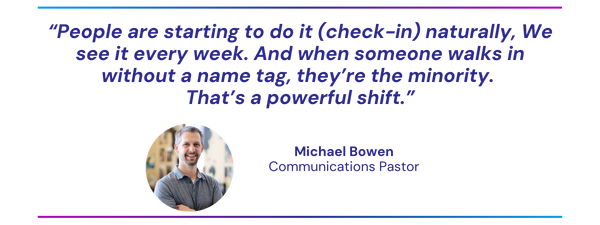
The heart of Broadmoor’s Check-In success lies in its cultural transformation. Historically, Check-In was limited to next-gen ministries for security tags. But with TouchPoint, Broadmoor began encouraging every attendee to check in, regardless of age or ministry involvement.
Check-In kiosks were strategically placed at main entrances and ministry areas, and the team prioritized ease of use and reliability. They opted to hardwire all stations to prevent the risk of Wi-Fi disruptions.
In just four weeks, Broadmoor saw nearly 70% of worship attendees checking in—a staggering achievement for a church that hadn’t emphasized Check-In in over a decade. That number recently rose to 72%.
The TouchPoint Team: Personal Touch Meets Strategic Support
To reinforce checking in, Broadmoor created a “TouchPoint Team” of volunteers and staff who manned kiosks each Sunday. These team members served a dual role: helping people navigate Check-In while also capturing feedback for ongoing improvement.
As Kathy noted, even less tech-savvy members found the new system easier than the previous one—and that’s no small win.
Staff were expected to serve during key windows, which not only provided Sunday morning support but also kept leadership engaged in the process. That visibility reinforced the church’s commitment to making checking in a part of their culture, not just a task.
And for guests who weren’t in the system? They got added into the database! As Kathy described, one man who had intentionally stayed under the radar for years finally asked for a name tag. “To catch you, I need your phone number,” Kathy told him. That simple interaction showed how Check-In was bridging the gap between anonymity and belonging.
Staff Engagement And Training
What made Broadmoor’s implementation so successful wasn’t just infrastructure—it was the engagement of the entire staff. Kathy sent out a daily “My TouchPoint Tip of the Day,” helping staff learn the platform in bite-sized, approachable ways. From updating profiles to searching birthdays, each tip was designed to make TouchPoint approachable and practical.
To cap off training, the team organized a TouchPoint scavenger hunt—a creative, interactive way to get staff exploring the system and learning by doing.
And the results speak for themselves. More than 380 members have already updated their profiles, including photos and contact information. Members are not just passively existing in the database—they’re actively participating in its accuracy.
Moving Forward: Next Steps
Broadmoor is already thinking ahead. Their team is exploring more efficient ways to process first-time guests, especially those who may not make it to the welcome desk. iPads with simplified forms may soon be deployed to help volunteers input guest info more quickly.
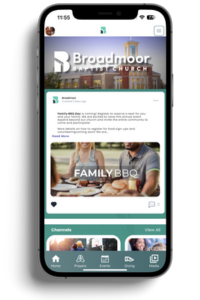
Broadmoor’s Church Branded Mobile App is also on the horizon. While it’s not live yet, the team is using this time to build anticipation and keep the momentum going. Once released, the app will add another layer of convenience, allowing families to Pre Check-In from their phones and streamline their Sunday mornings even further.
The Strategic Value Of Check-In
For Broadmoor, Check-In isn’t about tracking attendance. It’s about intentional ministry. It’s about making sure no one falls through the cracks. It’s about stewarding the people God brings through their doors.
As Michael put it, “Churches have historically made decisions based on anecdotal evidence. TouchPoint helps us be more strategic. But we had to set it up to win—it doesn’t do the work for you.”
Broadmoor Baptist’s journey with TouchPoint is a compelling example of how the right tools, paired with the right vision, can lead to cultural transformation. Their story reminds us that software isn’t just a system—it’s a ministry partner when deployed with purpose.
It’s never too early to start preparing for Christmas, especially when it comes to managing the various aspects of church activities. Join us for our upcoming “Christmas in July” webinar on July 25th at 2 PM CST. This webinar is designed to help church leaders and staff use their church management software effectively to streamline their holiday planning.
Webinar Details:
- Date and Time: July 25th, 2 PM CST
- Speakers: Cody Binder and Sarah Cavanaugh from TouchPoint Software
- Key Topics: Utilizing your Church Management Software for Christmas planning
Key Strategies for Christmas Planning:
- Using Involvements
- Checklists
- Volunteer Sign-Ups and Schedulers
- Marketing
- Mobile App
Other Creative Ways to Use Your Church Software This Christmas Season:
- Event Registration: Simplify the process for churchgoers to sign up for special Christmas events and services.
- Communication Tools: Automate emails and text messages to keep everyone informed about upcoming events and important dates.
- Resource Management: Track all your Christmas resources, from decorations to service materials, and ensure everything is accounted for.
- Attendance Tracking: Monitor attendance at Christmas events to understand engagement and plan for future events more effectively.
- Donations and Fundraising: Set up and manage Christmas-specific fundraising campaigns, making it easy for congregants to contribute.
Why Start Now?
Planning for Christmas can be time-consuming, but it doesn’t have to be stressful. By starting early and utilizing the tools available in your church management software, you can make the process enjoyable for your staff and ensure nothing is left to the last minute.
Who Should Attend?
This webinar is perfect for church leaders, administration staff, communications teams, production crews, and worship leaders. Whether you’re already using church database software or looking for ways to improve your Christmas setup, this session is for you.
Register Today!
Don’t miss out on this opportunity to get a head start on your Christmas planning. Join our Zoom webinar on July 25th at 2 PM CST and learn from the experts. Register Now!
Not Yet A Part Of The TouchPoint Family?
Schedule a free demo from one of our friendly team members, schedule a demo!
Missed Last Month’s Webinar?
You can watch our past webinars on YouTube in our Webinars playlist!
Join us tomorrow, June 27th, at 2 PM CST for our Q2 New Features Webinar, hosted by Chris Dolan and Hayley Whitworth. This informative session will cover the latest updates, including new church mobile app features, finance changes, and more. Don’t miss this opportunity to stay informed and enhance your church operations with our latest tools and strategies. Plus, we’ll be giving a special send-off to Chris Dolan as he concludes his time at TouchPoint Software.
Register now to ensure you don’t miss out on these exciting updates!
In our March New Features Webinar, we discussed the new Translations feature available in TouchPoint. The initial release included the ability to translate English word/phrases and the groundwork to add new languages. We are excited to announce that our recent update enabled Spanish translations!
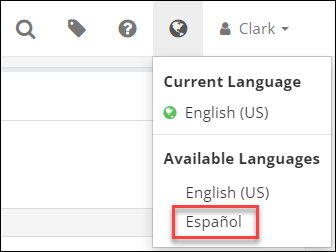
Users can switch languages in TouchPoint by clicking on the Earth icon in the top right of the menu bar and then selecting English or Spanish from the Available Languages section.
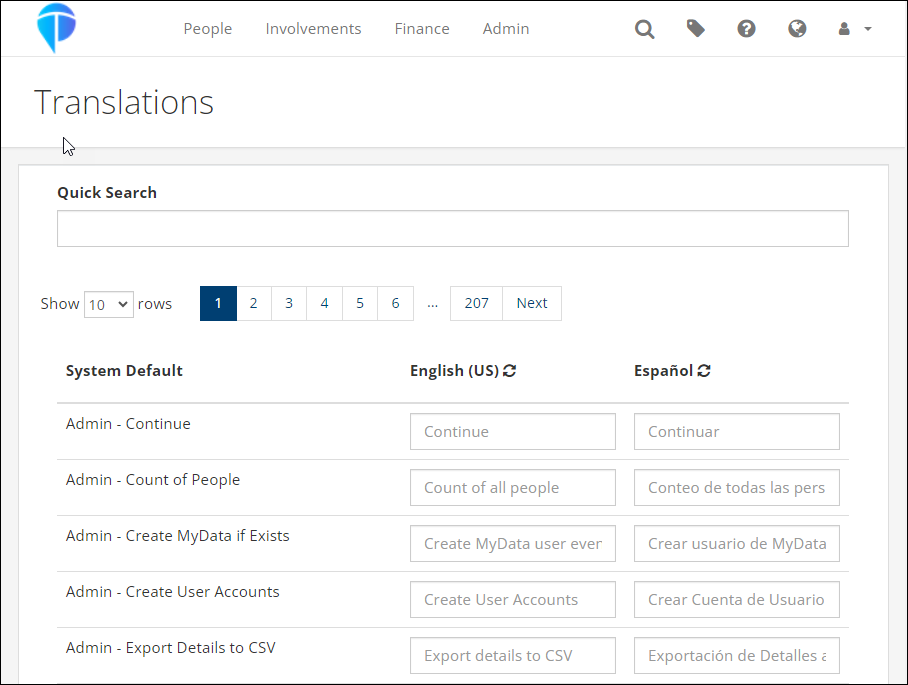
To modify any of the translations, an Admin can navigate to Admin > Advanced > Translations and make any necessary changes.
More languages will be added in the near future. If you have requests for specific languages, please let us know!
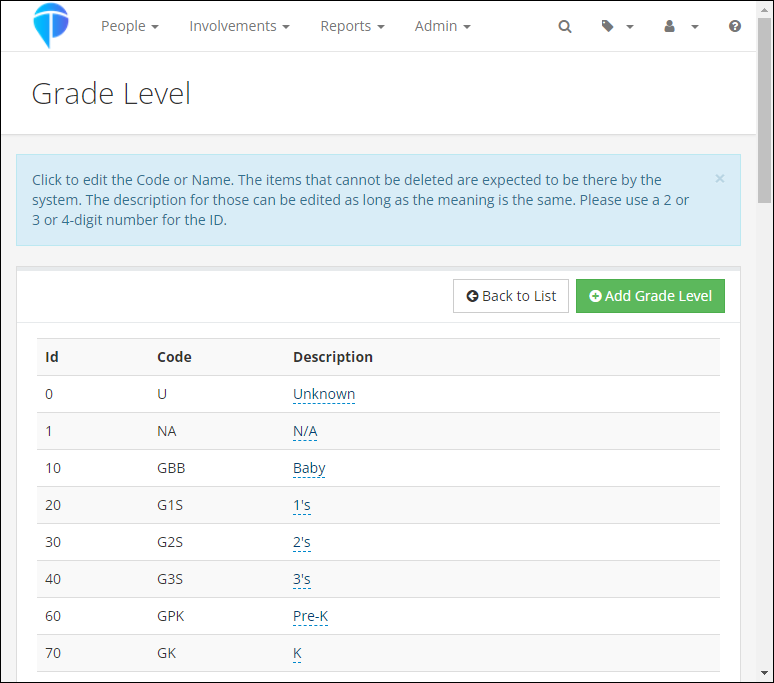
In 2022, we introduced several Grade and Promotion updates to better serve our partner churches. Here’s a summary of the key changes and how they can benefit your church:
New Grade Level Dropdown
We’ve added a Grade Level dropdown in Involvement and people records. This feature includes standard grade levels and allows you to add custom levels using Lookup Codes. To enable new levels, simply change the setting named Allow New Grade Levels (Admin > Advanced > Settings > System > Administration) to True. Reports that include Grade have also been updated to reflect this new Grade field.
Automatic Grade Promotion
We introduced a new admin setting called Grade Update Date. This setting automatically promotes each child’s Grade Level annually. The default promotion date is set to July 1st, but you can customize it to match your church’s annual promotion schedule. Note: If you select a date prior to today, the promotion will be skipped for this year.
Legacy Grade Field
Another new admin setting, Hide Grade Legacy, allows you to hide the legacy Grade field once it’s no longer needed. Please note that we will disable the legacy Grade field for all partner churches in July 2024 if it hasn’t been done already.
As you prepare for Vacation Bible School and other summer and fall registrations, please keep the following in mind:
- Check Your Grade Update Date: Ensure this setting aligns with your church’s promotion timeline.
- Consider Registration Timing: When including the Grade question in an Involvement, consider the timing of registration versus when the Grade will be automatically updated. For example, if a registrant states they will be in 11th grade in the fall and the update happens after, they may be promoted twice.
- Adding New Members: When adding new members to your database and then to a Main Fellowship Involvement with a Grade populated on the Settings > General tab, this Grade will be added to their record. However, it won’t affect existing records with a Grade.
For more detailed information, please refer to these help articles:
Grade Field
Grade
Administrative Settings
The June release was deployed Monday night, June 10. This includes new features and updates to existing features.
Finance Updates
The biggest update in this release is the completion of Phase 3 of the finance changes that we’ve been talking about for several months. This phase includes the new, improved Transactions Report that combines the current Contributions Search and Transactions Log. This new report will be released into beta initially, so most churches will not see it on their database. After further testing, we plan to make it available to everyone.
The following items will be visible to all churches immediately:
- There are 3 new Account-based roles available. These are similar to the current Fund-based finance roles, but note that these apply only to the new report (mentioned above) that is not available yet. Once this report is made live, you will have the ability to grant more granular access to people based on fund (using current roles) or account code (using the new roles listed below).
- ManageTransactions – This allows someone to see and manage all “non-contribution” transactions, unless the user also has the AccountManager role, in which case only transactions for those account codes will be visible.
- ViewTransactions – This is similar to ManageTransactions, but only lets someone view (not manage) all “non-contribution” transactions, unless the user also has the AccountManager role, in which case only transactions for those account codes will be visible. A user with this role cannot add transactions on the Member Dialog in an Involvement.
- AccountManager – This is used in conjunction with the ManageTransactions and ViewTransactions roles. It is a limiting role which signals that the user has an account-based finance role and limits the account codes that user sees based on the other roles the user has. This works like the FundManager role. If a user has this role, they can only select the visible Account codes based on their other roles in an Involvement.
- The Account Codes page now has a new dropdown menu to select the appropriate account management role for each account code.
- For churches using TouchPoint Giving, there is a new ACH Reversal Email template that is automatically sent to the donor whenever their ACH payment is reversed, along with the reason. NOTE: The church admin should update this template to add the following church contact information to the template.
- Contact Name
- Contact Phone Number
- Contact Email Address
- Changes made to pledges on the pledge management page are now tracked in the Contribution Change Log.
- The following updates have been made to the Batch Entry to make adding and managing contribution entries as easy as possible.
- When a new person is added for a scanned check, the check image will now appear on all screens of the process.
- There is an admin setting that can be enabled to show a person’s campus code when searching to add someone to a contribution.
- There is a new Post Contribution Pledge Funds admin setting that will allow you to specify the fund ID of funds that you want to see pledges/pledge balances for on a person’s record when searching to associate a person to a contribution.
- People ID’s less than 5 digits now pull into the People Search.
- Registration Credits has been updated to work similarly to Soft Credits and the following changes have been made.
- Error messages will be displayed if the user does not select a registrant or if a registrant is not in the selected Involvement.
- A green dot will display after the donor’s name if a contribution has a registration credit associated with it. This is similar to the blue dot that displays for Soft Credits. The Registration Credit checkbox will be checked and the section will be expanded if the contribution is opened for editing.
- When the Registration Credit section is expanded on a contribution that previously had that information entered, the registrant will display.
- Once a contribution has been saved with a Registration Credit, no changes can be made to the Registration Credit information and no further adjustment transactions can be created if that contribution is saved after editing other information.
- Users with the FinanceAdmin role can manually delete adjustment transactions, including those created because of a Registration Credit on a contribution.
- Donor Total Summary Report Updates
- This report will now show consistent results between tabs for units and amount by date.
- The new menu will display this report based on the same security restrictions that the old menu used.
- Several updates were made to Soft Credits to make them even easier to use.
- A blue dot has been added to items on a person’s Giving tab if the item is a Soft Credit.
- Header column sorting has been added to the Soft Credit section on a person’s Giving tab.
- Two new Search Builder Conditions have been added to specifically find people with Soft Credits.
- Soft Credit Recipient Number of Days – Enter the numbers of days to look back, Fund ID (or leave blank for all funds) and specify True or False to find any Soft Credit recipients.
- Soft Credit Recipient Date Range – Enter the date range, Fund ID (or leave blank for all funds) and specify True or False to find any Soft Credit recipients.
- When a finance user transfers gifts from deceased person to their surviving spouse, any associated soft credits will now move as well.
- Check images will now be available on a person’s giving tab for finance users to quickly reference.
- The following miscellaneous fixes/updates have been made related to the finance area.
- When completing an ACH reversals all the relevant information is now included.
- When processing a refund through TouchPoint, it will now go into the correct batch.
- Voided transactions will now automatically be removed from the pending batch.
- Voids that are processed on the TouchPoint Giving gateway will now show in the settlement report.
- On the pledge search page, the number of families field now reflects all filtered results.
- Credits that are processed on the TouchPoint Giving gateway will now show in correct settlement batch.
The following miscellaneous changes will also be included in the release:
- The Quick Sign-in settings have been adjusted to separate cell and email into two separate options for each church.
- If a donor that is associated with a PushPay gift is re-assigned, then the donor ID is now moved to the new record.
- The expiration on the Get Sub Link on the Volunteer Calendar has been extended from 3 to 7 days.
In addition to the above finance and other miscellaneous changes, several items related to the New Registrations have been addressed. The new registrations are in beta with several churches, and we are working hard to put the new forms through rigorous testing so that they can be made available for all churches as soon as possible.
Here are the updated items:
- The settings tab on involvements using the new forms, has been completely re-designed and reorganized.
- Setting up new questions no longer requires an open pledge fund
- Questions where options have reached their limit will now be grayed out if the limits have been reached upon page load
- We now verify limits for all question on the final checkout screen
- Unchecking “show” will now uncheck “required” on personal questions
- Email template renamed and updated to remove erroneous question marks
- Adding new person not in family shows blank address now
- Better cell phone formatting
- When adding someone to a meeting, the person is now added as attending
- If a new person is added under the age of 18, then they are added as a child
- Processing Fee works with Suggested Fee Question
- Registration Terms has been updated to show terms file name
- Registration now respect checkbox for whether address is required
- A user’s info no longer can be cashed into form
- When registering a child (non-logged-in), duplicates are not created if phone or email matches one of the parents
- Registrations now show in the app based on existing settings
We are excited for our upcoming webinar, “Getting Staff On Board & Keeping Them On Board,” hosted by TouchPoint Software. This insightful event is scheduled for May 30th at 2 PM CST. You can join us via the following link: Webinar Registration.
Our friends, Jessica Siri from RockPointe Church and TouchPoint’s Marketing Director, Hayley Whitworth, will guide you through essential strategies for successful staff adoption and ongoing support of church management systems. The webinar will cover:
- Understanding and navigating change
- Effective project management
- Engaging and lasting staff training
- Overcoming common obstacles
This session is a must-attend for anyone involved in church management, especially those looking to improve their staff’s engagement with your church management system. Don’t miss out on this opportunity to enhance your church’s operations and foster a supportive environment for your team.
Join Our Webinar
Register now to reserve your spot today and ensure your staff is fully equipped to embrace and support your church management system.
Today, technology changes daily, and churches must decide whether to keep old systems or switch to modern ones. Our program works perfectly on computers and phones. It makes managing your church easier and helps you connect better with your congregation.
The Shift from Legacy to Modernization
Legacy systems used to be essential for church management, but now they are outdated, like rotary phones or dial-up internet. These systems can slow you down and stop you from growing. Our church management software helps your church run smoothly and keeps your data safe in the cloud. This means you don’t have to worry about constant updates or losing information.
Legacy systems often have many problems. They can be slow, hard to use, and require a lot of maintenance. They might also lack important features that modern churches need, like mobile access and real-time updates. By switching to a new system, you can avoid these issues and focus more on your church’s mission.
Key Features of Modern Church Management
1. Cloud-Based Flexibility and Security
Our cloud storage keeps your data safe and grows with your community. Cloud storage means your information is stored online instead of on local computers. This ensures that your data is always accessible and secure. You won’t have to worry about losing data due to computer crashes or other issues. Cloud solutions also mean you are always using the most up-to-date software without performing manual updates. This lets your church focus on its mission instead of dealing with technical problems.
2. Mobile Integration
As highlighted in our webinar, “Creating a Unified Experience with ChMS, Websites & Mobile,” mobile technology is changing ministry by allowing real-time updates and interactions feeding from your database system to your website and to your mobile app as an all-in-one ecosystem. Our mobile app keeps your church members connected, whether they are at home or on the go. This means churchgoers can check schedules, sign up for events, and stay updated with church news from their phones. Mobile integration ensures that everyone stays connected and informed, which can help build a stronger sense of community. It also makes it easier for people to participate in church activities, no matter where they are.
3. Elevated Process and Communication Tools
Our tools make connecting and welcoming new members easier. Personalized communication helps every church member feel cared for, supporting their spiritual growth and building community. With our system, you can send targeted messages to different groups within your church, such as new members, volunteers, or parents. This ensures that everyone receives the information relevant to them. You can also track interactions and follow up with people who might need extra support, helping to foster a more connected and supportive church community.
4. Real-Time Data for Proactive Discipleship
You set the rules for how your church engages. Staff and leaders get alerts to help members who might be drifting away. This helps keep everyone involved and ensures no one feels forgotten. Real-time data allows you to see how members interact with the church and identify those who might need extra attention. For example, if someone hasn’t attended services or events for a while, you can reach out and check in on them. This proactive approach can help retain members and ensure everyone feels valued and supported.
5. Efficient Task Management and Reporting
Our system makes managing tasks simple. The mobile app lets leaders and volunteers track their activities easily. Every interaction is recorded and can be reviewed later. This helps staff manage discipleship paths and member involvement. Efficient task management ensures that everyone knows what they need to do and can easily keep track of their responsibilities. It also makes it easier to generate reports and see how different areas of the church are performing. This information can help you make informed decisions and improve church operations.
Conclusion
Leaving old systems behind is a big step towards making your church’s operations future-ready. Our software offers an integrated, secure, and mobile-friendly solution that improves all parts of church management. By using our modern system, your church can eliminate complicated processes and focus more on what really matters—building a strong and engaged community.
Old systems may have served you well in the past, but they can no longer meet the needs of a growing, modern church. Embracing new technology can help you streamline your operations, improve communication, and engage your congregation more effectively. It can also free up time and resources, allowing you to focus more on your ministry and less on administrative tasks.
Our church management software is designed to support you in this transition. It provides all the tools you need to manage your church efficiently and effectively. From cloud-based storage to mobile integration, our system is built to meet the needs of today’s churches. It offers a user-friendly interface, robust security features, and the flexibility to grow with your community.
Embrace the future with TouchPoint Software!
Discover our features, see our impact, and join us in transforming church management. Schedule a demo today to see how we can help modernize your ministry for today’s world. By making the switch, you can ensure that your church is well-equipped to meet future challenges and continue to thrive in an ever-changing world.
Managing attendance effectively is crucial for any church that values engagement and participation. At TouchPoint Software, we understand the importance of keeping a close eye on your attendance metrics. That’s why we’re excited to highlight a tool that transforms how you view attendance data—the Week at a Glance Report.
What is the Week at a Glance Report?
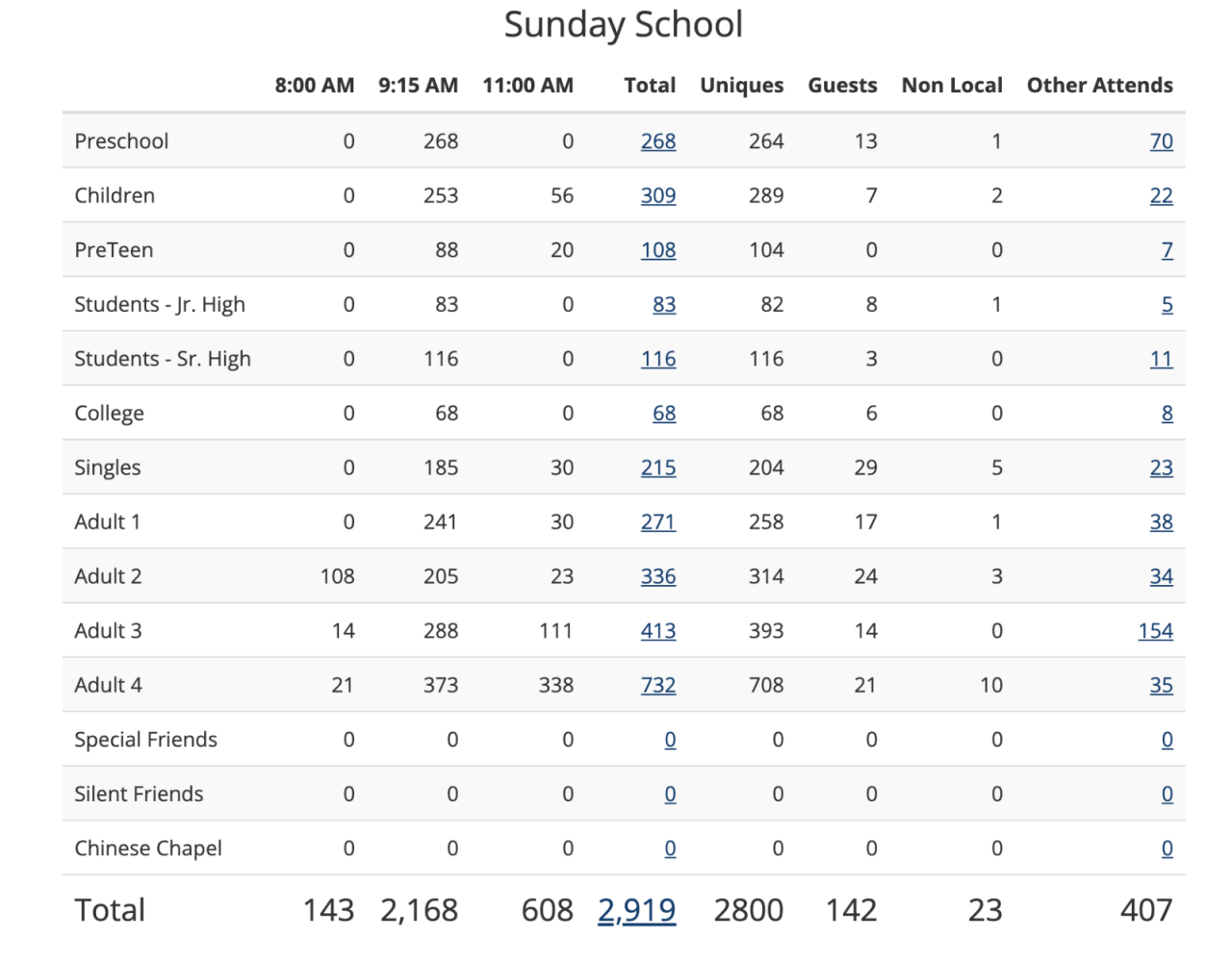
The Week at a Glance Report is an essential feature available under the Admin > Reports menu, specifically designed to streamline the process of analyzing attendance across all your ministries. This report is not just a tool; it’s a comprehensive solution for evaluating attendance across specified Divisions. The report is even able to pull from numerous attendance methods at once.
Why Use the Week at a Glance Report?
Here’s why the Week at a Glance Report is a game-changer for your church:
Centralized Data: Consolidate attendance information from various events and programs into one unified report. This allows for a clear, concise view of your who’s attending what, helping you make informed decisions quickly.
Completely Customizable The report is configured using the Programs and Divisions pages under the Admin menu. The best part: you decide what to report on! Whether it’s Preschool, Children’s, and Adults Ministries; first, second, and third service; or comparing campuses – you specify the Divisions and the times. You can tailor the report to meet the specific needs of your church, ensuring that you are always in control of the data displayed.
Advanced Features and Capabilities: Packed with a multitude of features, the Week at a Glance Report is versatile and powerful. To fully leverage these capabilities, we recommend reading our detailed help article, “Configure the Week At A Glance Report.” This guide will walk you through every step, ensuring you maximize the potential of this tool. Don’t have time? We can help!
Need Assistance?
Setting up and customizing reports can sometimes be daunting. That’s why our expert Consulting team is ready to assist you. By purchasing two hours of consulting, you can have one of our friendly, dedicated team members configure the Week at a Glance Report tailored specifically for your needs. Click here to get started.
Enhancing Communication with Custom Backgrounds
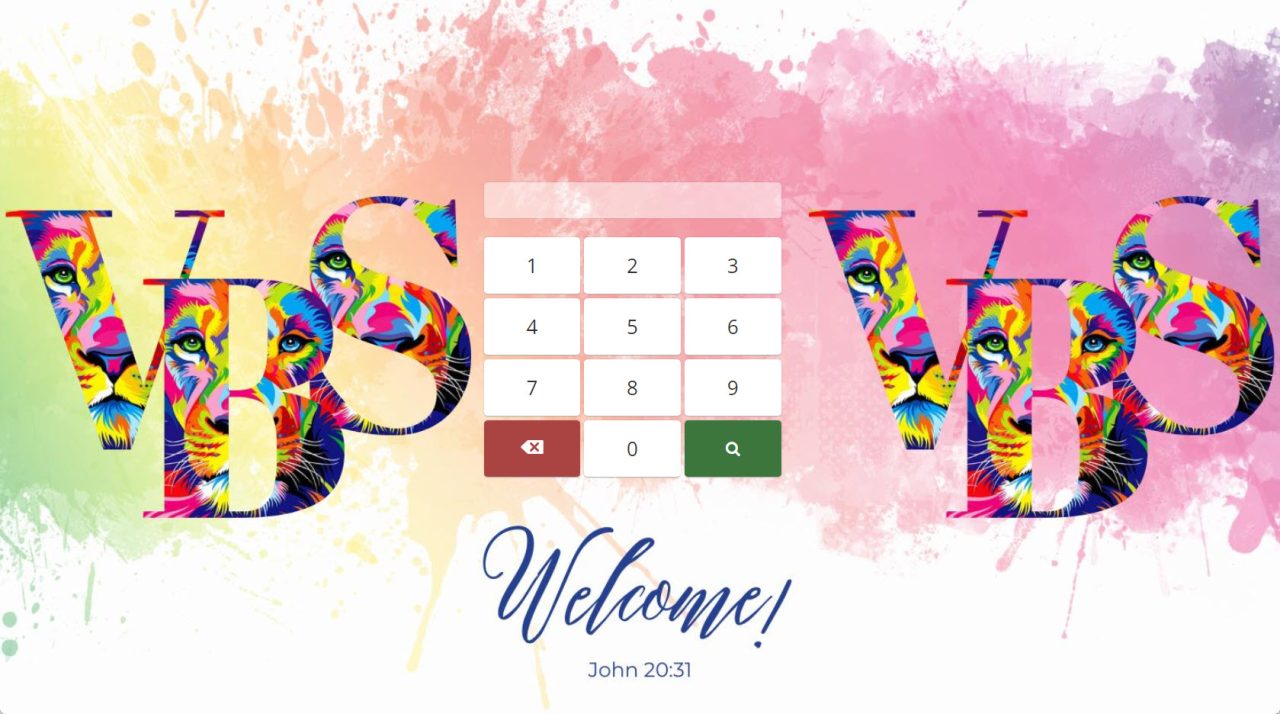
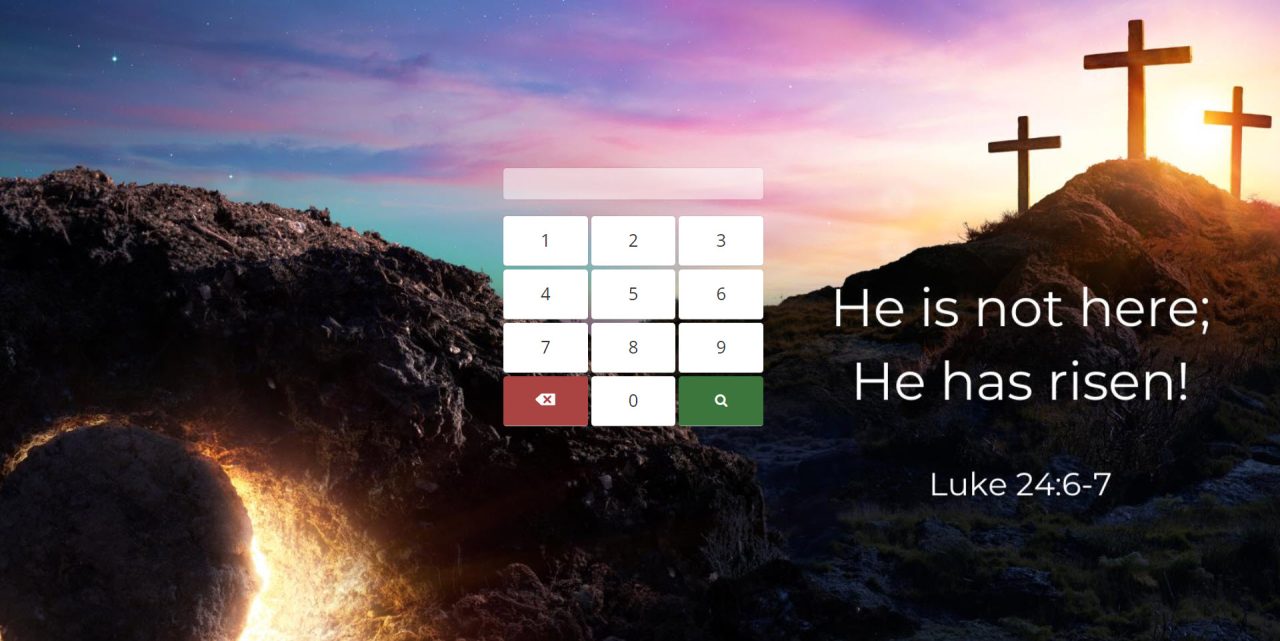
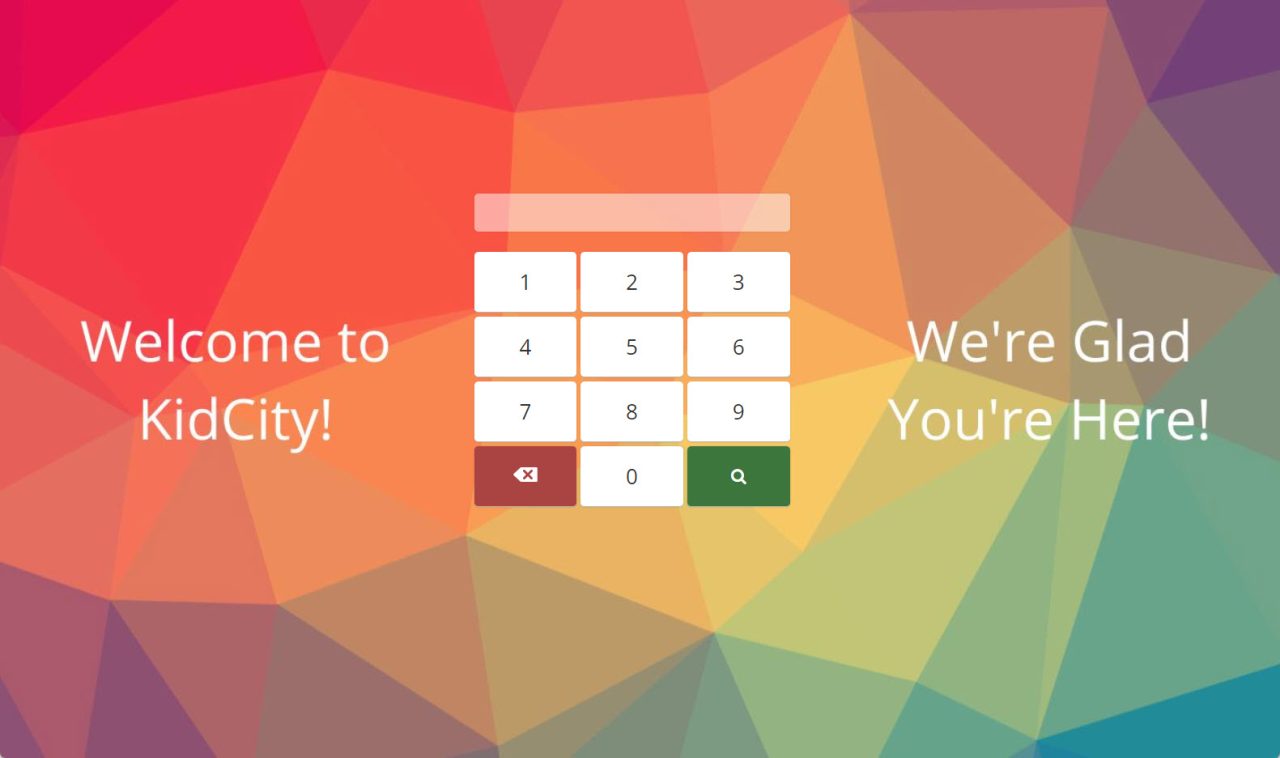
Immediate Updates: The ability to swiftly communicate new events or last-minute changes is crucial for any active church community. Customized Check-In backgrounds serve as a direct communication channel, ensuring that everyone from parents to volunteers is immediately aware of any updates as they check in.
Engagement and Visibility: Custom backgrounds can highlight upcoming events, schedule changes, or important announcements, making sure they catch the eye of your community members. This not only boosts engagement but also ensures that critical information is not missed.
Consistency in Branding: Every background can be tailored to include your church’s branding elements, such as logos and color schemes. This consistency reinforces your church’s identity and makes every piece of communication instantly recognizable.

How It Works
TouchPoint Software makes it easy to implement customized Check-In backgrounds that keep your community informed and engaged:
- Design Consultation: Discuss your communication needs with our team. Whether it’s promoting an upcoming church retreat, notifying changes in service times, or highlighting new ministry opportunities, our designers will help create a background that conveys your message effectively.
Get Started Today!
Are you ready to transform how your church communicates during the check-in process? If you’re interested in leveraging custom background templates to distribute information effectively, click here to set up an appointment.
Our commitment at TouchPoint Software is to enhance the operational efficiency and communication clarity of partner churches. Custom Check-In Profile backgrounds are just one of the many tools we provide to support your church’s growth and ensure that every interaction within your community is impactful and informative. Contact us today to see how our solutions can help streamline your church communications.
Our consulting team is ready to support you in getting this started; this requires one hour per background. You can set up an appointment with our friendly and amazing team here.

Discover Seamless Integration with TouchPoint Software
Join Chris Dolan, Head of Product & Strategy at TouchPoint, and Brad McIlwain, President at Solertiae, for an inspiring webinar on how TouchPoint Software is revolutionizing church management through seamless communications across web and mobile platforms. This event is perfect for church leaders, communications teams, and IT professionals eager to unify their congregation’s digital experience.
Join Us Thursday, April 25th at 2:30 PM CST
Key Features to Explore:
- Unified Experience: Seamless database login across platforms, ensuring a cohesive experience from web to mobile
- Comprehensive Engagement Tools: Engage churchgoers with native giving, registration, media, and attendance functionalities
- Preview of Upcoming Features: Sneak peek at the new group management tools on the mobile app
- TouchPoint Sites Showcase: Real examples of launched sites that demonstrate the software’s capabilities and widget functionalities
Why Attend This Webinar?
Join this webinar to discover how unifying your church management software with your website and mobile app can streamline church management and enhance congregational engagement. Learn effective digital strategies to connect seamlessly with your community, increase participation, and efficiently manage church activities. Don’t miss the chance to transform your church’s digital engagement.
Discover Seamless Integration with TouchPoint Software
Join Chris Dolan, Head of Product & Strategy at TouchPoint, and Brad McIlwain, President at Solertiae, for an inspiring webinar on how TouchPoint Software is revolutionizing church management through seamless communications across web and mobile platforms. This event is perfect for church leaders, communications teams, and IT professionals eager to unify their congregation’s digital experience.
Join Us Thursday, April 25th at 2:30 PM CST
Key Features to Explore:
- Unified Experience: Seamless database login across platforms, ensuring a cohesive experience from web to mobile
- Comprehensive Engagement Tools: Engage churchgoers with native giving, registration, media, and attendance functionalities
- Preview of Upcoming Features: Sneak peek at the new group management tools on the mobile app
- TouchPoint Sites Showcase: Real examples of launched sites that demonstrate the software’s capabilities and widget functionalities
Why Attend This Webinar?
Join this webinar to discover how unifying your church management software with your website and mobile app can streamline church management and enhance congregational engagement. Learn effective digital strategies to connect seamlessly with your community, increase participation, and efficiently manage church activities. Don’t miss the chance to transform your church’s digital engagement.