






















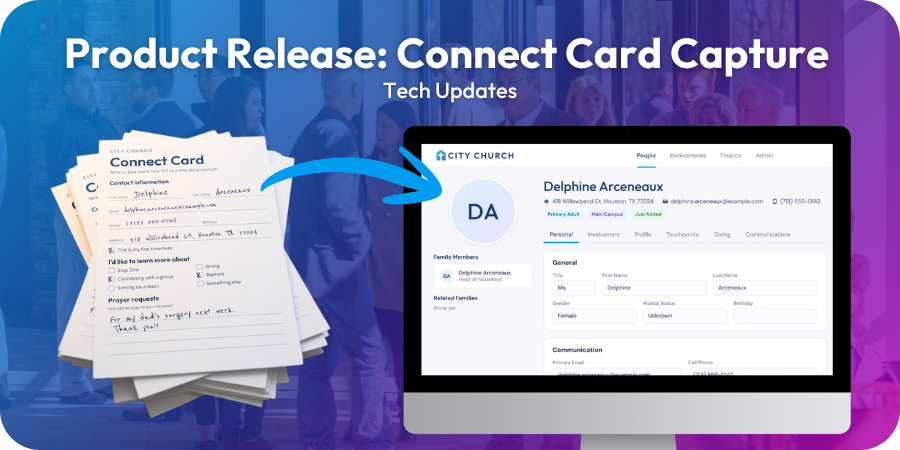
Every Sunday, someone fills out a connect card. It might be a family visiting for the first time, a longtime attender who finally checked the box for baptism, or someone sharing a prayer request. Each card is a person raising their hand to take a next step.
Then Monday comes, and those cards land in a stack waiting to be typed in one at a time. The longer they wait, the harder it is to follow up while the moment still matters.
That’s why we built Connect Card Capture!
Connect Card Capture is an AI-enabled feature built right into TouchPoint. Upload photos or scans of your cards, and TouchPoint reads each one for you. Your team reviews what TouchPoint found, makes any corrections, and adds new people or updates existing ones in a few clicks.
How Connect Card Capture Works
It follows four simple steps:
- Set up a template. Tell TouchPoint what your card collects, or upload a photo of a blank card and let TouchPoint suggest the fields.
- Capture your cards. Upload photos or a scanned PDF, or let welcome team volunteers snap photos on a phone or tablet with Quick Capture.
- Check the queue. See at a glance which cards are ready for review and which have been imported.
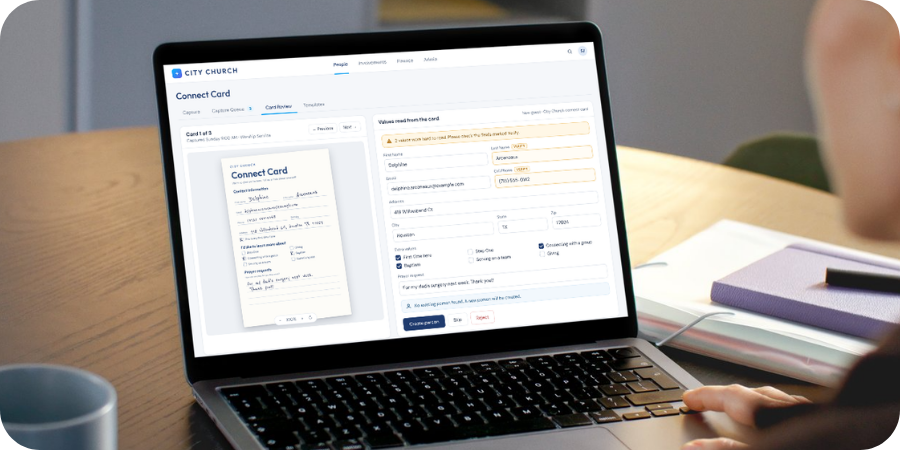
- Review & import. See the card side by side with what TouchPoint read, fix anything that needs it, and import.
Why Your Team Will Love It
- Less typing, faster follow-up. Spend your time connecting with guests instead of entering their information.
- Easy for volunteers. Quick Capture is a simple, photo-only page, so your welcome team can capture cards right at the guest table.
- Fewer duplicates. Before importing, TouchPoint looks for people who may already be in your database, so you can update the right person instead of creating a second record.
- Context comes along. Capture cards for an Involvement and Meeting, and new guests can be connected to that ministry from the start. Every new person is also marked with an Origin of Connect Card, which makes follow-up and reporting easier.
Your Team Always Has the Final Say
TouchPoint’s Connect Card Capture does a good job with messy handwriting and misspellings, but no reading is perfect. That’s why every card is reviewed by a person before anything changes in your database. Anything TouchPoint wasn’t sure about is flagged, so your reviewer knows exactly where to look.
Getting Started
Connect Card Capture is available at no additional cost. This feature is turned off by default until your church chooses to turn it on. An administrator can enable Connect Card Capture at any time by going to the Enable Connect Card setting under System > Administration.
We can’t wait to hear how Connect Card Capture helps your team walk alongside each person in their faith journey!
Additional Resources
Ready to dig in? These guides walk through each step of Connect Card Capture:
- Connect Card Overview: How Connect Card works and how to turn it on
- Card Templates: Set up a template for each style of card your church prints
- Capturing Cards: Upload photos or scans, or use Quick Capture on a phone or tablet
- The Capture Queue: See which cards are ready for review and which have been imported
- Reviewing Cards: Check flagged values, then add a new person or update an existing one
- October 12, 2026 Release Notes: Everything included in this release
TouchPoint Consulting
Ready To Take TouchPoint To The Next Level?
Whether you’re rolling out Connect Card Capture or rethinking how guests take their next step, our Strategic Consulting team can help. We’ll work alongside your staff, by video call or on-site, to strengthen a ministry area and get more out of the tools you already have.